
Google Workspace Marketplace


Unsubscribe: AI Inbox Shield & Bulk Email Cleaner
Bulk unsubscribe from newsletters and mailing lists in Gmail™. AI Inbox Shield remembers every sender you left and keeps them out of your inbox for good. Free for your first 5 unsubscribes.
Listing updated:30 august 2026
Works with:
17 K+




Prezentare generală
Unsubscribe for Gmail™ clears newsletters and mailing lists out of your inbox, and AI Inbox Shield keeps them from coming back.

🔍 Scan Your Subscriptions
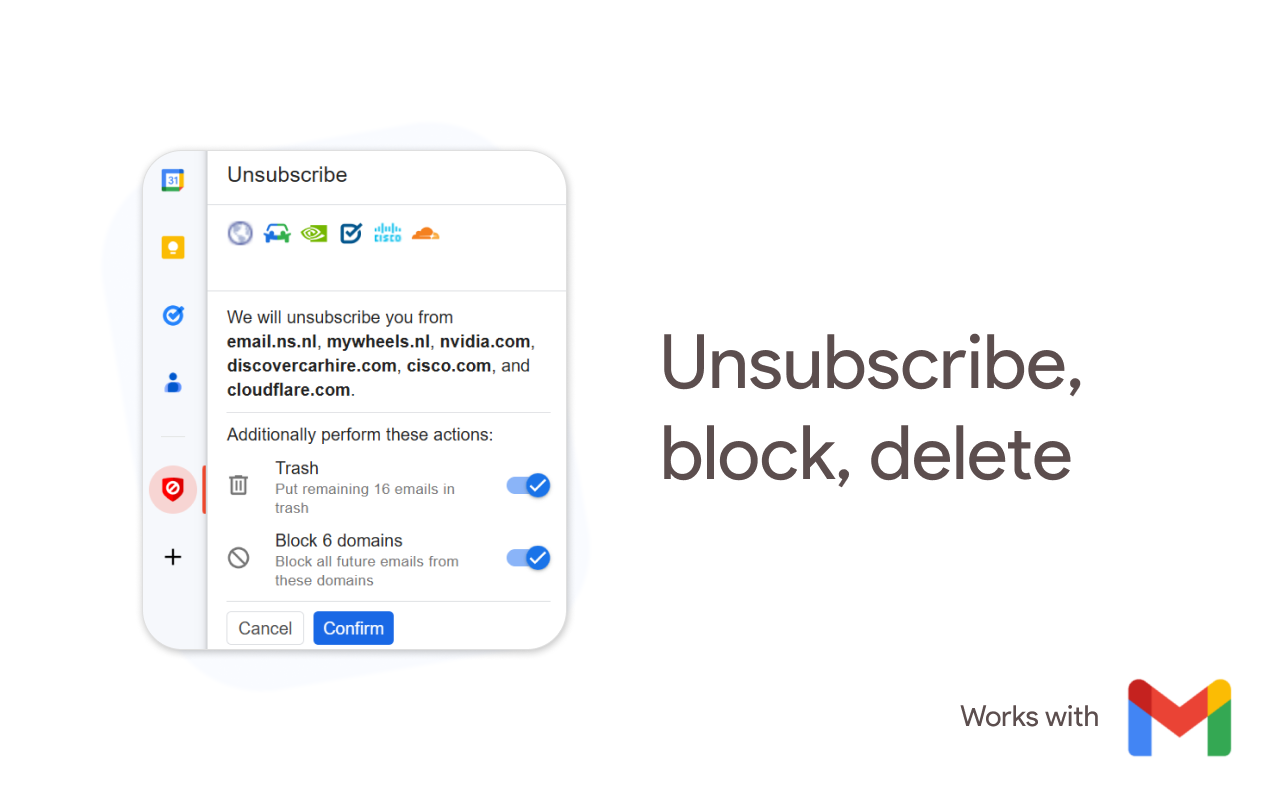
One scan finds every newsletter, promotion and mailing list sending to your address, grouped by sender so you can see at a glance who mails you most.

📭 Bulk Unsubscribe
Select as many as you like and opt out of all of them in one action. The add on visits each unsubscribe link for you, so a dodgy link never reaches your machine.

🛡️ AI Inbox Shield
Unsubscribing is a request, not a guarantee. Plenty of senders carry on regardless, or start again months later. Inbox Shield remembers every list you left and keeps their mail out of your inbox automatically, so a sender who ignores an opt out gets nowhere. One switch, and you never think about them again.

🚫 Sender and Domain Blocker
When you want something gone outright, a Gmail filter blocks the sender, the domain, or the whole mailing list. The domain blocker covers every address at a sending domain at once, and as a newsletter blocker it holds even when the list reappears under a new name.

🗑️ Delete, Archive or Label
Clear out the backlog at the same time. Auto delete emails you will never read, auto archive emails worth keeping but not seeing, or file them under a label. Your choice, applied in bulk.

📱 Works Everywhere Gmail™ Does
Use it in Gmail™ on the web, in the Gmail™ app on iOS and Android, or through our Chrome extension.

━━━━━━━━━━━━━━━━━━━━

🎯 How people use Unsubscribe for Gmail™

📉 Taking back an inbox that got away from you
Email overload is rarely one bad actor; years of shops, forums and services add up. A single scan turns that into a list you can act on: remove subscriptions in bulk, and delete the mail that already arrived. Most people finish their first newsletter cleanup in a few minutes and take several hundred emails a week off their plate.

🛒 After a sale, a signup or a conference
One purchase can put you on a dozen lists. Use it as a subscription cleaner right after: scan, opt out of everything you did not ask for, and let AI Inbox Shield block the ones that carry on regardless. A quick gmail cleanup beats letting it build up for another year.

🔁 For the senders who will not take no for an answer
This is the job Inbox Shield was built for. Some lists keep sending after you opt out, and some go quiet for a month and start again. Turn Inbox Shield on once and every sender you have unsubscribed from stays blocked, so smart unsubscribe means the decision holds instead of needing to be made twice. Automatic unsubscribe you set up once.

📰 Deciding what is actually worth reading
It doubles as a subscription tracker, showing what each sender actually sends you before you decide. Not every list is junk. Keep the two newsletters you read, stop promotional emails from everyone else, and opt out of newsletters you have not opened in a year. It is the inbox cleanup tool for people who still want some mail.

💼 Keeping a work inbox usable
Use it to stop marketing emails from vendors and manage subscriptions across a whole team address. Email management and inbox management tend to mean a weekly ritual; one round of email decluttering here is closer to email spring cleaning you only do once.

✅ Perfect for:
📧 Personal inboxes buried in newsletters
🛒 Shoppers on every retailer's list
💼 Work accounts full of vendor marketing
🔁 Anyone fighting senders who ignore an opt out
🔒 People who want an email opt out that does not sell their address

🔒 Privacy and security

We do not sell or share your data with anyone. We are based in the EU and work under GDPR.

We never store the content of your emails, only the metadata needed to unsubscribe, such as a message ID and the unsubscribe method.

We use OAuth2 rather than IMAP. IMAP hands a tool full, lasting access to your mailbox and an app password to store; OAuth2 grants temporary, scoped access instead. Nothing is downloaded or installed.

This add on passed Google's CASA security review before it could be published.

Keywords: unsubscribe, ai unsubscribe, smart unsubscribe, automatic unsubscribe, email unsubscriber, bulk unsubscribe, mass unsubscribe, inbox shield, newsletter cleanup, subscription manager, mailing list manager, sender blocker, domain blocker, email cleaner, declutter inbox

🎁 Your first 5 unsubscribes are free. No credit card required.

- Works with any Gmail™ account, personal or Google Workspace™
- We cannot read your emails, and never ask for permission to
- No IMAP setup, no software to install
- Also from Codemoon: Clean Inbox for Gmail™ for filters, and Guard Email for Gmail™ for aliases

Gmail™ is a trademark of Google LLC.
Additional information
sell
PricingFree of charge with paid features
code
Developer
Non-comerciant
email
Asistență
lock
Politica de confidențialitate
description
Condiții de furnizare a serviciilor
flag
RaporteazăFlag as inappropriate


Căutare
Șterge căutarea
Închide căutarea
Aplicații Google
Meniu principal