
Google Workspace Marketplace


CAD Viewer for Drive™
A professional 2D CAD viewer for Google Drive™ handling DWG, DXF, and SVG files natively with real-time sharing and commenting.
Автор:
Дата оновлення:23 січня 2026 р.
Підтримує:
6 тис.+



Огляд
CAD Viewer is a professional-grade visualization and collaboration agent designed specifically for engineering and architectural drawings in Google Drive™.

✓ No AutoCAD installation required. ✓ Native Google Drive™ integration. ✓ Real-time Collaboration.

Built on a high-precision vector engine, CAD Viewer allows you to visualize, inspect, annotate, and collaborate on 2D CAD drawings directly within your browser.

Say goodbye to expensive software licenses just to view a drawing.

CAD Viewer renders your DXF, DWG, and SVG files instantly with complete layer control.

ℹ Learn more on https://cadviewer.co

FEATURES
📐 Universal 2D CAD Support

Seamlessly view industry-standard CAD formats used in architecture, construction, and engineering directly from your cloud storage.

Supported Formats: DWG, DXF, SVG.

Version Compatibility: Supports files from older AutoCAD versions up to the latest releases.

Vector Precision: Crisp zooming and panning without loss of quality, regardless of drawing size.

🤝 Collaboration & Annotation

Move beyond simple viewing; transform your workflow into a collaborative workspace.

Real-time Commenting: Leave feedback, revision notes, or questions directly on specific areas of the drawing.

Secure Sharing: Share access to drawings with colleagues or clients without sending attachments.

Threaded Discussions: Resolve design queries efficiently with reply threads linked to specific coordinates.

🛠 Advanced Inspection Tools

Turn your browser into a capable CAD inspection tool.

Layer Management: Toggle visibility of specific layers (e.g., electrical, plumbing, structural) to isolate systems.

Navigation: Pan, zoom, and rotate with intuitive controls designed for technical drawings.

Object Properties: Click on elements to view metadata, line types, and layer assignments.

📏 Measurement & Scale

Precision Measurement: Measure lengths, areas, and perimeters directly on the drawing.

Scale Calibration: Calibrate the viewer to the drawing's scale for accurate takeaways.

Coordinate Tracking: View X/Y coordinates in real-time as you navigate.

☁️ For Google Drive™ Integration

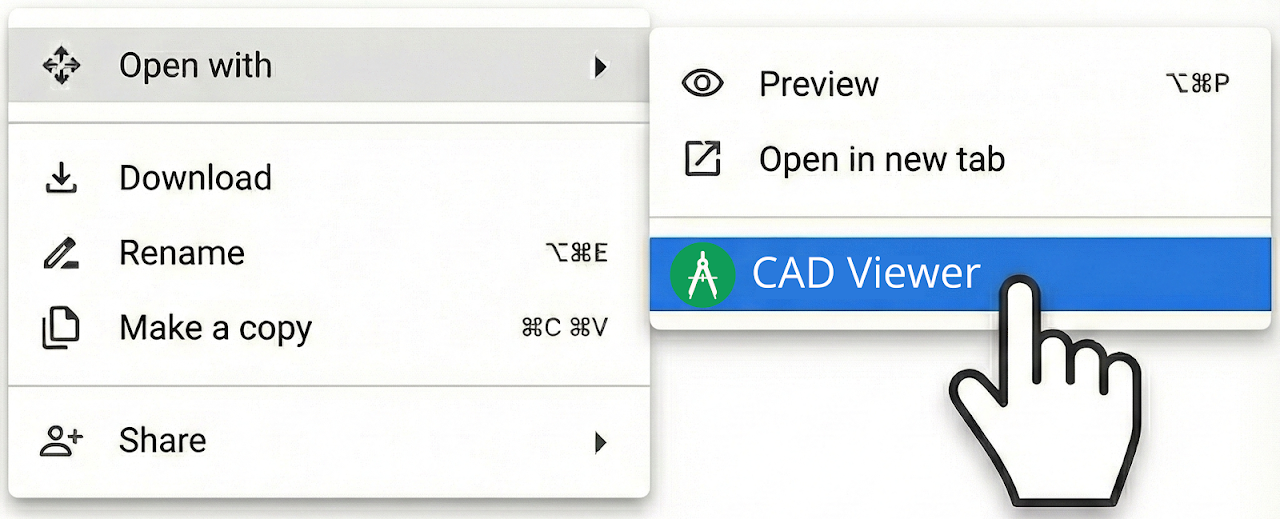
"Open With" Functionality: Right-click any DWG or DXF file in Drive and open it instantly.

Zero Footprint: View heavy CAD files without downloading them or installing desktop CAD software.

Cloud Security: Keep your proprietary drawings secure in the cloud; no local downloads required for viewing.

● QUICK TUTORIAL
1️⃣ Upload a CAD file (e.g., .DWG or .DXF) to Google Drive. 2️⃣ Right-click the file and select "Open with" > "CAD Viewer". 3️⃣ Use the layer manager to filter views or the comment tool to leave feedback for your team.

● PRICING
CAD Viewer offers a robust Free version for essential viewing and simple navigation. The Pro plan unlocks advanced measurement tools, layer management, and unlimited collaboration features.

● OUR USERS ARE
Architects: Review floor plans and elevations on the go without launching heavy software.

Civil Engineers: Inspect site plans and utility layouts directly from the cloud.

Contractors: Access the latest drawing revisions and measurements on-site.

Project Managers: Leave comments and review progress without needing CAD training.

This add-on was developed by Rhovium.com
Додаткова iнформацiя
sell
ЦіниБезкоштовна версія з платними функціями
code
Розробник
Не продавець
email
Підтримка
lock
Політика конфіденційності
description
Умови використання
flag
СкаргаПоскаржитися






Пошук
Очистити пошук
Закрити пошук
Додатки Google
Головне меню