
Google Workspace Marketplace


WhatsApp Message Automation: GreenTick
Send automated WhatsApp template messages from Google™ Sheets. Trigger on new rows, status changes, dates, schedules or Google™ Form responses with GreenTick.
정보 업데이트:2026년 10월 2일
호환 기기:
리뷰 없음
사용자가 없습니다.




개요
Automate WhatsApp messages straight from Google™ Sheets.

WhatsApp Message Automation: GreenTick connects your spreadsheet to the official WhatsApp Business Platform through your GreenTick account. Send approved WhatsApp template messages to customers automatically whenever your sheet changes — no code, no copy-paste, and no switching between tabs.

Perfect for order confirmations, shipping updates, payment reminders, appointment reminders, lead follow-ups, event invitations, and customer notifications.

━━━━━━━━━━━━━━━━━━━━
HOW IT WORKS
━━━━━━━━━━━━━━━━━━━━
1. Install the add-on and open Extensions → WhatsApp Message Automation: GreenTick → Open automations.
2. Paste your GreenTick API key.
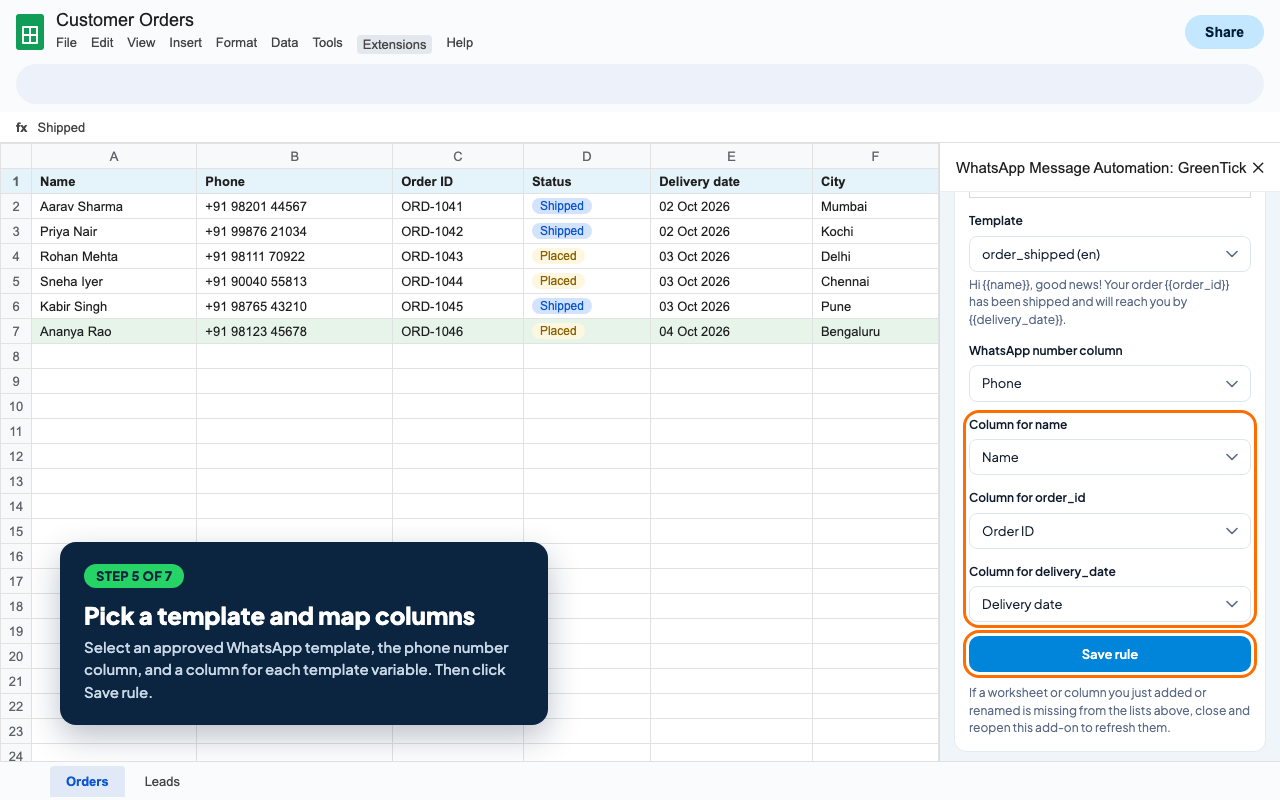
3. Create a rule: choose a worksheet, a trigger, the phone number column and an approved WhatsApp template.
4. Map template variables such as {{name}} or {{order_id}} to your sheet columns.
5. Turn the rule on. Messages are sent automatically when the trigger fires.

━━━━━━━━━━━━━━━━━━━━
WHATSAPP AUTOMATION TRIGGERS
━━━━━━━━━━━━━━━━━━━━
• New row – send a WhatsApp message when a new row is filled in, e.g. a new order or lead.
• Column change – send when a column changes, e.g. Status becomes "Shipped" or "Paid".
• Date is today – send reminders on the date in a column, e.g. appointments, renewals or due dates.
• Schedule – send daily or weekly at the hour you choose to rows that match a filter.
• Google™ Form submit – send an instant WhatsApp reply when someone submits your Google™ Form.

━━━━━━━━━━━━━━━━━━━━
KEY FEATURES
━━━━━━━━━━━━━━━━━━━━
• Official WhatsApp Business API templates – uses the approved templates from your GreenTick account.
• Personalised messages – fill template variables from any spreadsheet column.
• Media header templates – image, video and document headers use the approved template sample automatically.
• Dynamic button links and copy-code buttons – fill URL and coupon values from your sheet.
• Up to 20 automation rules per spreadsheet, each with its own on/off switch.
• Recent sends log – see every trigger with the phone number, rule name and the success or error message, updated live.
• Duplicate protection – the same row is not messaged twice for the same event.
• Your sheet stays untouched – the add-on reads your data and never writes back into your cells.
• Plan-aware – if your GreenTick plan expires, all rules turn off automatically so nothing is sent by mistake.

━━━━━━━━━━━━━━━━━━━━
POPULAR USE CASES
━━━━━━━━━━━━━━━━━━━━
• E-commerce: order confirmation, dispatch, delivery and COD confirmation messages.
• Sales and CRM: instant WhatsApp follow-up for new leads captured in Google™ Sheets or Google™ Forms.
• Clinics, salons and services: appointment reminders and booking confirmations.
• Finance and billing: payment reminders, invoice alerts and renewal notices.
• Education and events: admission updates, class reminders, registrations and event invitations.
• HR and operations: interview schedules, onboarding messages and shift updates.

━━━━━━━━━━━━━━━━━━━━
PRIVACY AND SECURITY
━━━━━━━━━━━━━━━━━━━━
• Works only on the spreadsheet where you open it.
• Your API key and automation settings are stored with that spreadsheet, not in any shared location.
• Only the phone number and the mapped column values needed for a message are sent to GreenTick to deliver it.
• You can remove your API key or turn off any rule at any time.

━━━━━━━━━━━━━━━━━━━━
REQUIREMENTS
━━━━━━━━━━━━━━━━━━━━
• An active GreenTick account and API key (greentick.ai).
• A WhatsApp Business number connected to GreenTick with at least one approved message template.

Message delivery status and customer replies are available in Live chat on your GreenTick dashboard.

Start sending automated WhatsApp notifications from Google™ Sheets today with GreenTick.추가정보




검색
검색어 지우기
검색 닫기
Google 앱
기본 메뉴