
Google Workspace Marketplace

Zeto Sign
Add legally binding eSignatures to Google Forms™. Respondents sign on any device, and signature images are automatically saved directly into your Google Sheets™ responses. Fast, secure, and easy.
デベロッパー:
リスト更新日:2026年8月14日
対応デバイス:
2023+



概要
Zeto Sign lets you collect legally binding eSignatures directly from your Google Forms™ workflow. If you use Google Forms™ for consent forms, waivers, HR onboarding, approvals, or client agreements, Zeto Sign closes the gap that Google Forms™ doesn't handle natively: a real, secure eSignature attached to every single submission.

Instead of asking clients to print, scan, or use complicated third-party PDF software, respondents sign directly from any phone, tablet, or desktop using a finger, mouse, or stylus. When they hit submit, Zeto Sign natively pushes the signature data straight into your connected Google Sheets™ document. No app switching. No printing. No manual data entry.

━━━━━━━━━━━━━━━━━━━━━━━━━━━━━━━━━━━━━━
Why teams pick Zeto Sign
━━━━━━━━━━━━━━━━━━━━━━━━━━━━━━━━━━━━━━

Privacy-First Architecture: Unlike other add-ons, Zeto Sign does NOT ask for permission to read your Google Drive™ or access your Spreadsheets. We request the absolute minimum permissions required to keep your data safe.

Native Google Sheets™ Sync: Because Zeto Sign integrates seamlessly with Google's native submission process, signatures appear instantly in your response spreadsheet.

Flawless Mobile Experience: Respondents can easily draw their signature on any mobile device or tablet.

Built for Speed: Simple setup, clean modern interface, and zero complex training required.

━━━━━━━━━━━━━━━━━━━━━━━━━━━━━━━━━━━━━━
How Zeto Sign works with Google Forms™
━━━━━━━━━━━━━━━━━━━━━━━━━━━━━━━━━━━━━━

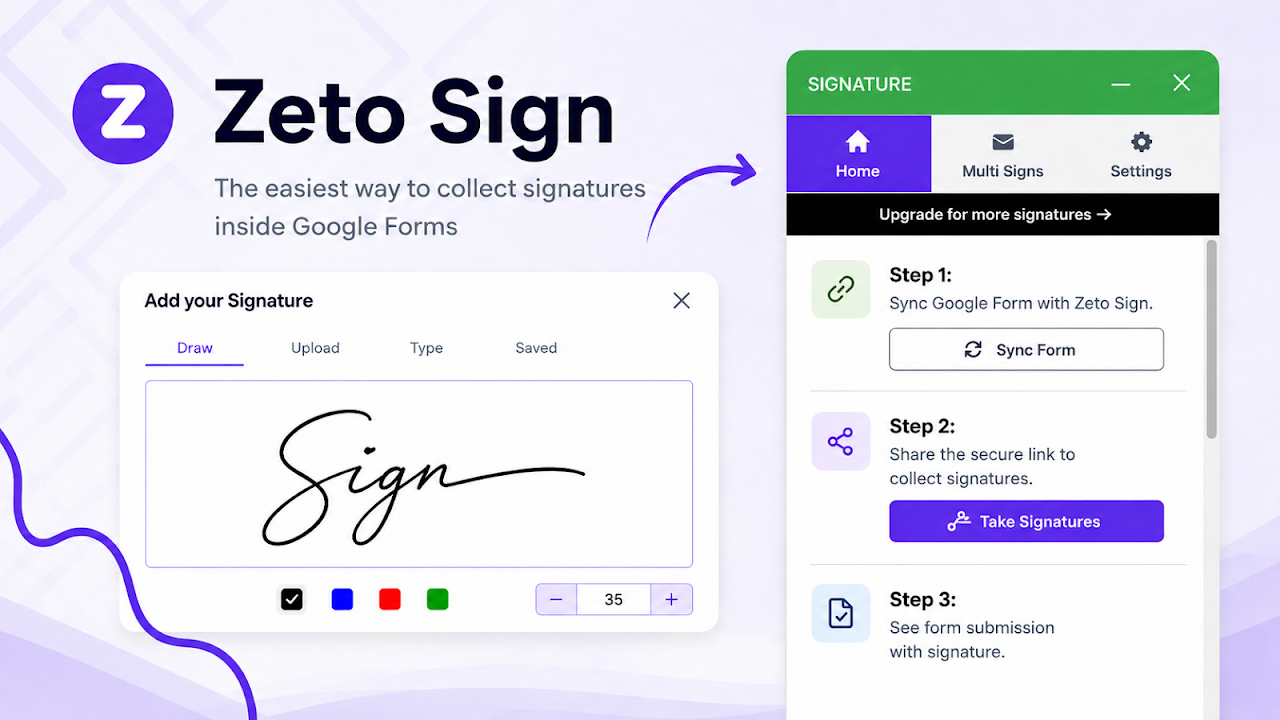
Install Zeto Sign from the Google Workspace Marketplace™.

Open the add-on from the Google Forms™ add-ons menu.

Sync your form with one click.

Share your secure Zeto Sign link with your respondents.

Signers complete the form and draw their signature on any device.

Responses are instantly recorded in your Google Forms™ and connected Google Sheets™ files.

━━━━━━━━━━━━━━━━━━━━━━━━━━━━━━━━━━━━━━
Security, Privacy, and Compliance
━━━━━━━━━━━━━━━━━━━━━━━━━━━━━━━━━━━━━━

Zeto Sign was built with enterprise-grade privacy in mind. While older legacy add-ons require invasive permissions to read your entire Google Drive™ or all of your Google Sheets™, Zeto Sign's modern architecture completely bypasses this. We only ask for the minimum scopes needed to sync your form questions. Your data remains yours, and we never sell, share, or use your workspace data for AI model training.

Google Forms™, Google Workspace™, Google Docs™, Google Sheets™, and Google Drive™ are trademarks of Google LLC. Zeto Sign is an independent add-on and is not affiliated with, endorsed by, sponsored by, or otherwise associated with Google LLC.
詳細情報




検索
検索をクリア
検索を終了
Google アプリ
メインメニュー