
Google Workspace Marketplace


ZIP Extractor
ZIP File Extractor For Gmail™ and Drive™
बनाने वाली कंपनी:
लिस्टिंग को पिछली बार अपडेट किया गया:18 अप्रैल 2026
इनके साथ काम करता है:

2 लाख+


अवलोकन
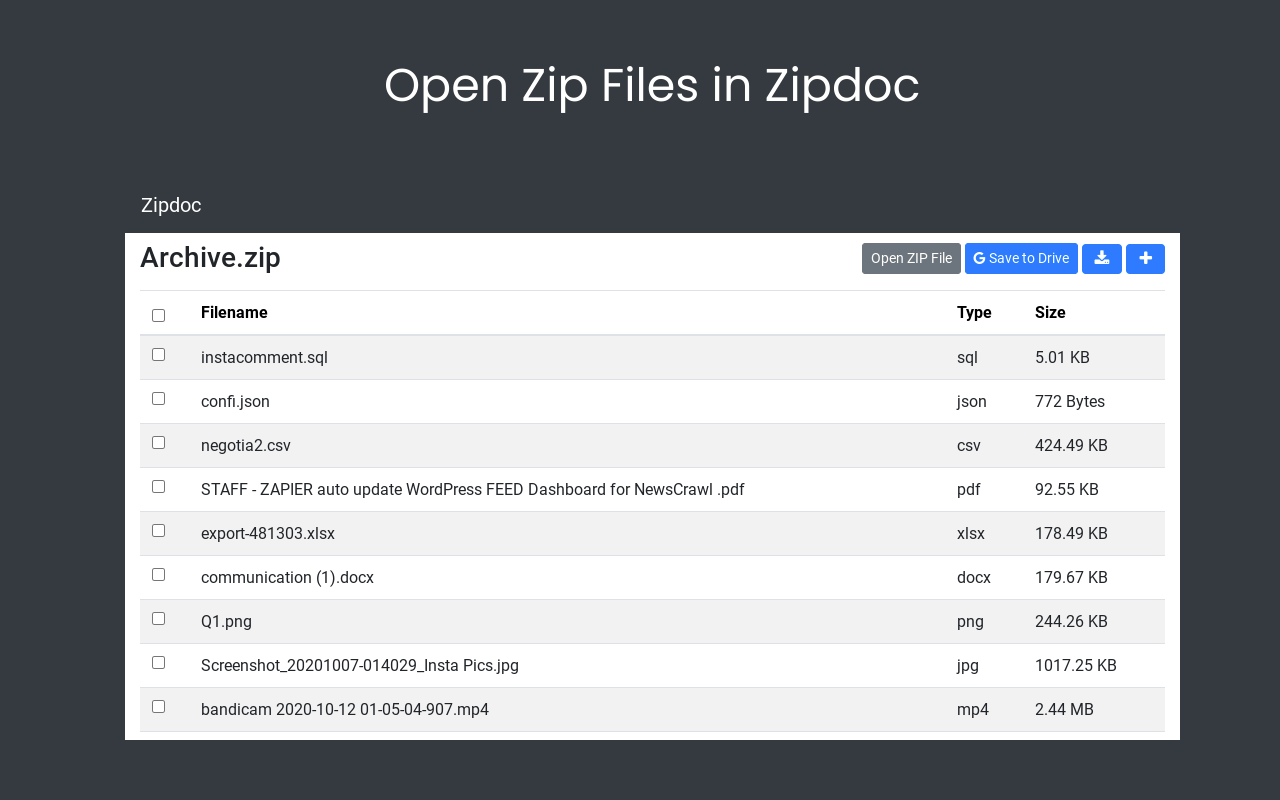
Zipdoc is a secure web app that allows you to extract ZIP files to your device or to Google Drive™. Upload and share files through a unique, shareable url.

How to use the Zipdoc Gmail™ add-on:

1) Install the app.
2) Open an email with a ZIP file attached.
3) Click 'OPEN IN ZIPDOC' next to the file you'd like to work with.
4) View the contents of the ZIP file within Zipdoc, download the files or save to Google Drive™.
5) Open additional ZIP files by clicking 'Open ZIP File' button.

How to use the Zipdoc Drive™ add-on:

1) Install the app.
2) Click to open or right click a ZIP file in Gmail™ or Drive™.
3) Click 'Open with Zipdoc' in the overlay.
4) View the contents of the ZIP file within Zipdoc, download the files or save to Google Drive™.

Features of Zipdoc:

*Efficient Loading - Since ZIP Doc loads each ZIP file in the browser and not on a server, ZIP files can be opened very efficiently and quickly. The contents of the ZIP files are never saved anywhere and are only accessible to the user who opened the ZIP file.
*Unique URLs - Each ZIP Doc has a unique URL which can be saved or bookmarked for later use. Since the opened ZIP files are not saved on a server, users can re-upload new ZIP files multiple times.
*Dowloadable Files - ZIP Doc allows users to download any and all file types within a ZIP file to the device. This means that these file types and more and be saved any time - doc, csv, mp4, json, jpg, pptx, docx, jpg, png, gif, xlsx, pdf.
*Google Drive™ - Extract and save important files in Google Drive™ as individual files rather than an uneditable ZIP file. This allows users to save important files that are accessible any time in Drive™.
*Upload & Share - After you extract your files, upload and share files up to 10 MB through a shareable url accessible to anyone with the url. All uploaded files are automatically deleted from the server after 30 days.
*All Platforms - Meant to be an alternative to WinZip (Windows, MacOS, iOS, Android), ZIP Doc is available on all platforms because it's a web app on all major browsers including Chrome, Firefox, Safari, Edge.

Use Cases for Zipdoc:

Unzipping ZIP Files.
Gmail™ and Google Drive™ .do not allow users to unzip ZIP files, so ZIP Doc can do this for you. ZIP Doc allows users to unzip ZIP files in order to interact with the files contained in the ZIP file.

Extracting ZIP Files.
ZIP Doc allows users to download any files contained in the ZIP file to their device or to Google Drive™.

Unique Unzipping URLS.
ZIP Doc gives users a unique URL that can be bookmarked and reused anytime they need to unzip a ZIP File or extract files from a ZIP File.

Sharing Files.
Upload and share files through a unique, shareable url. Files are hosted for 30 days then automatically removed from the server.

What is a Zip File Extractor?

A zip file extractor is program that opens zip files and allows users to extract the contents. There are many ways how to open a zip file including winzip, winzip rar download, free winzip, download winzip, unzipper mac and our free unzip program. Users can use our free zip file opener by clicking the open zip file button above and there's no need to download winzip. There is a free winzip download but that's only a free trial. Our zip extractor works unzipping on the web for Windows, Mac, Chrome OS and is a Google Workspace add-on for Google Drive™ and Gmail™. The add-on lets you extract zip file in google drive because it was originally built to be a google drive™ zip extractor.
अतिरिक्त जानकारी
sell
कीमतबिना किसी शुल्क के
code
डेवलपर
व्यापारी नहीं है
email
सहायता
lock
निजता नीति
description
सेवा की शर्तें
flag
शिकायत करेंआपत्तिजनक ऐप्लिकेशन की शिकायत करें



खोजें
खोज हटाएं
खोज बंद करें
Google ऐप
मुख्य मेन्यू