
Google Workspace Marketplace


Zoho Social
Zoho Social is a powerful social media management software for businesses and agencies.
बनाने वाली कंपनी:
लिस्टिंग को पिछली बार अपडेट किया गया:29 जनवरी 2026
14 हज़ार+


अवलोकन
Zoho Social is built keeping in mind the needs of businesses and digital media agencies that are serious about social media marketing.
Right from scheduling and publishing content in multiple ways, to creating intuitive reports and responding to what matters—Zoho Social provides powerful tools to brands that need help with building a strong presence on social media.
We support 6 social channels: Facebook Page, Twitter Profile, Instagram Profile, Google My Business Listing, LinkedIn Page, and LinkedIn Profile.

Features you and your team will love

Publishing and Scheduling
It includes a powerful set of features that empower you with all the social media publishing tools that your business needs.
* Publishing Calendar
You can preview your scheduled posts, drag and drop to reschedule, and manage your content pipeline—all from a single screen.
* Content Queues
We give you the option to create your own posting schedule with unique time slots. If you're unsure when to publish, you can rely on SmartQ predictions to publish at times when your audience is most active.
* Bulk Schedule
If you're taking a long break, the Bulk Scheduler has you covered. Use a spreadsheet to create as many social media posts as you like, and schedule them in one go.

Monitoring
There's a Monitor tab that enables you to track relevant social conversations and respond to what matters.
* Listening Dashboard
You can create columns to track reviews, keywords, or mentions. It'll be easy for you to build new connections by discovering and participating in relevant conversations across social channels.
* Live Stream
A real-time stream of updates where you can see incoming engagements as and when they happen. Get all the context you need to respond to everyone who interacts with your brand on social media.
* Direct Messages
Feel free to reply inline to all the messages you receive on Facebook and Twitter. Also, you can check out their social profile information, and see who responded from your team.

Collaboration
If you’re managing a team, Zoho Social’s collaboration features and custom user-roles make it easy for you to bring all the members on board to manage social accounts for multiple brands.
* Discuss
Start a new discussion around a post draft, talk about an influencer who mentioned you, or just hit Discuss on anything that's worth talking about.
* Roles and Permissions
You can bring your colleagues on board and create specific roles for them. Assign which social channels and features they have access to.
* Tagging Members
Drafted a new copy? @Mention your teammates and get feedback. Or, tag them in conversations to get them participating in what's important.

Reports and Analytics
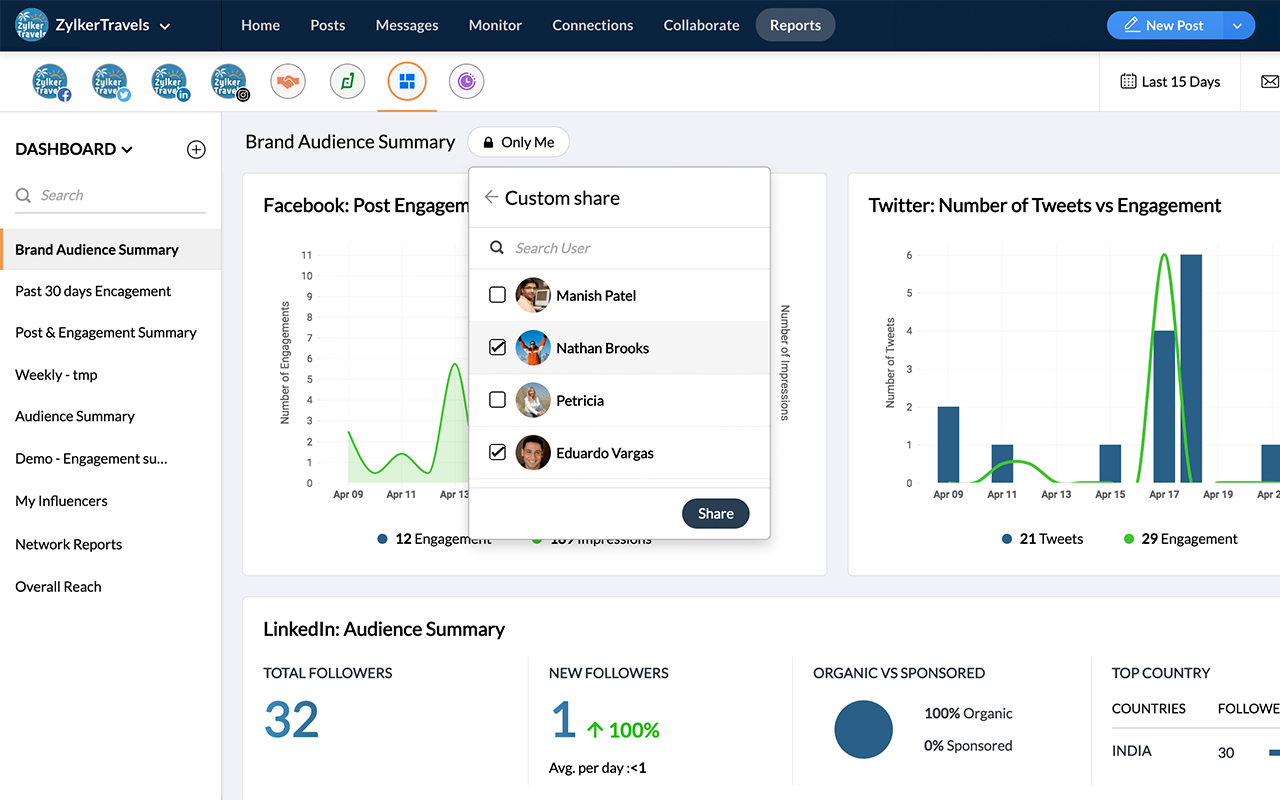
Advanced Reporting features help you analyze performance using intuitive graphs, and create custom report dashboards for you or your clients.
* Stats and Analytics
You can discover where your followers are from, the type of content they love, what your connections are saying about you, and other metrics to analyse your brand's performance.
* Custom Reports
Choose from a wide range of analytics to tailor-make reports for multiple social channels. Add more visual appeal to your reports with colourful graphs and charts.
* Schedule Reports
Set up a schedule, decide on the frequency, and automate reports to be delivered to your team and clients at a date and time of your choice.

More features:
* Zoho CRM Integration
Generate leads from social media and identify which social channels bring in maximum revenue. This integration lets you enrich leads and contacts in Zoho CRM with social data, and help your sales force close deals faster.
* Zoho Desk Integration
Convert social media updates into tickets and respond to messages as quickly as possible. Work together with your support team to deliver the best social customer support experience.
* Facebook Lead Ads Integration
Connect your Facebook Lead Ads account with Zoho Social to collect and monitor leads in real time. Analyze the performance of your ad campaigns, and drive lead information to Zoho CRM.
* zShare Browser Extension
Our zShare browser plugin lets you curate interesting articles as you discover them. Craft unique copies for each social channel and share them directly from your browser.

Zoho Social for Agencies
Digital Media Agencies can bring all their clients on to Zoho Social, and manage their social media presence effectively. They can easily add new brands/clients, and assign team members to them with a predefined role.
Agencies can also custom-label Zoho Social with their domain name, logo, and favicon.

Top-rated on G2Crowd, GetApp, and Capterra
icon1icon2icon3icon1icon2icon3icon1icon2icIndependent review sites like G2Crowd, Capterra, and GetApp have consistently rated Zoho Social as a leader in the social media management & marketing software category. We have over 3500+ reviews by our users on these websites.

Zoho Social is also a part of Zoho.com, a suite of 40+ products trusted by over 45 Million users worldwide.
अतिरिक्त जानकारी
sell
कीमतउपलब्ध नहीं
code
डेवलपर
email
सहायता
lock
निजता नीति
description
सेवा की शर्तें
flag
शिकायत करेंआपत्तिजनक ऐप्लिकेशन की शिकायत करें




खोजें
खोज हटाएं
खोज बंद करें
Google ऐप
मुख्य मेन्यू