Defend against agentic risks with multi-layered protections in Google Workspace Studio

Tim Quinney
Senior Product Manager
Try Google Workspace at No Cost
Get a business email, all the storage you need, video conferencing, and more.
SIGN UPAgentic flows in Google Workspace Studio can boost productivity by automating routine, daily tasks with intelligent capabilities. However, when these flows have the context, authority, and privileges to act on a user’s behalf, they can become key targets for attackers seeking to compromise them through unauthorized actions or sensitive data exposure.
With that in mind, Studio incorporates multi-layered defenses to mitigate risks from threat actors and robust observability tools to help organizations adopt agents safely. Built natively on Google’s secure-by-design architecture, Studio combines native threat defenses with deep ecosystem visibility to secure multi-step agentic workflows.
Multi-layered threat defenses
Studio offers the following built-in defenses to enable secure collaboration and productivity:
- Abuse mitigations
- Identity isolation
- Admin controls and user confirmation
- Runtime protections
Layer 1: Abuse mitigations
As the foundation of Studio's multi-layered defense strategy, native abuse mitigations deliver comprehensive protection across every flow through a cascading classifier system. To identify malicious injections in the system, Studio employs a series of specialized classifiers, which include a dedicated self-reflection assessment.
This self reflection capability goes beyond traditional content classifiers to actively protect against indirect prompt injection attacks by monitoring for system drift. By continuously tracking the full operational cycle — prompt, context, and output — self reflection identifies execution drifts caused by malicious intent. If the fetched content attempts to introduce harmful instructions that manipulate LLM behavior, the system detects the abuse and instantly halts flow execution.
Layer 2: Identity isolation
A specialized identity isolation architecture forms the second layer of defense for Studio. Rather than utilizing privilege impersonation to execute tasks with the owner's full credentials, Studio generates a dedicated OAuth Client ID that is restricted to a least privileged subset of the owner's permissions, with a minimally assigned set of OAuth scopes required for the flow's specified set of tasks.
For example, a flow configured in Studio to send emails via Gmail will not have access rights to other Workspace applications, such as Google Drive or Chat. Due to this restriction, even if a flow is compromised by a prompt injection attack, the accessible data and potential impact are strictly limited to the user's Gmail corpus and relevant Gmail actions.
When a flow executes an action, Workspace administrators can configure settings to specify whether the action is attributed directly to the flow or to the owner across Workspace product surfaces. By revealing the flow’s name, collaborators have clear visibility into whether an action was generated by automation. Additionally, audit logs created during flow execution explicitly capture when an action was performed by the flow and under which user’s authority, regardless of the attribution preferences selected by admins.
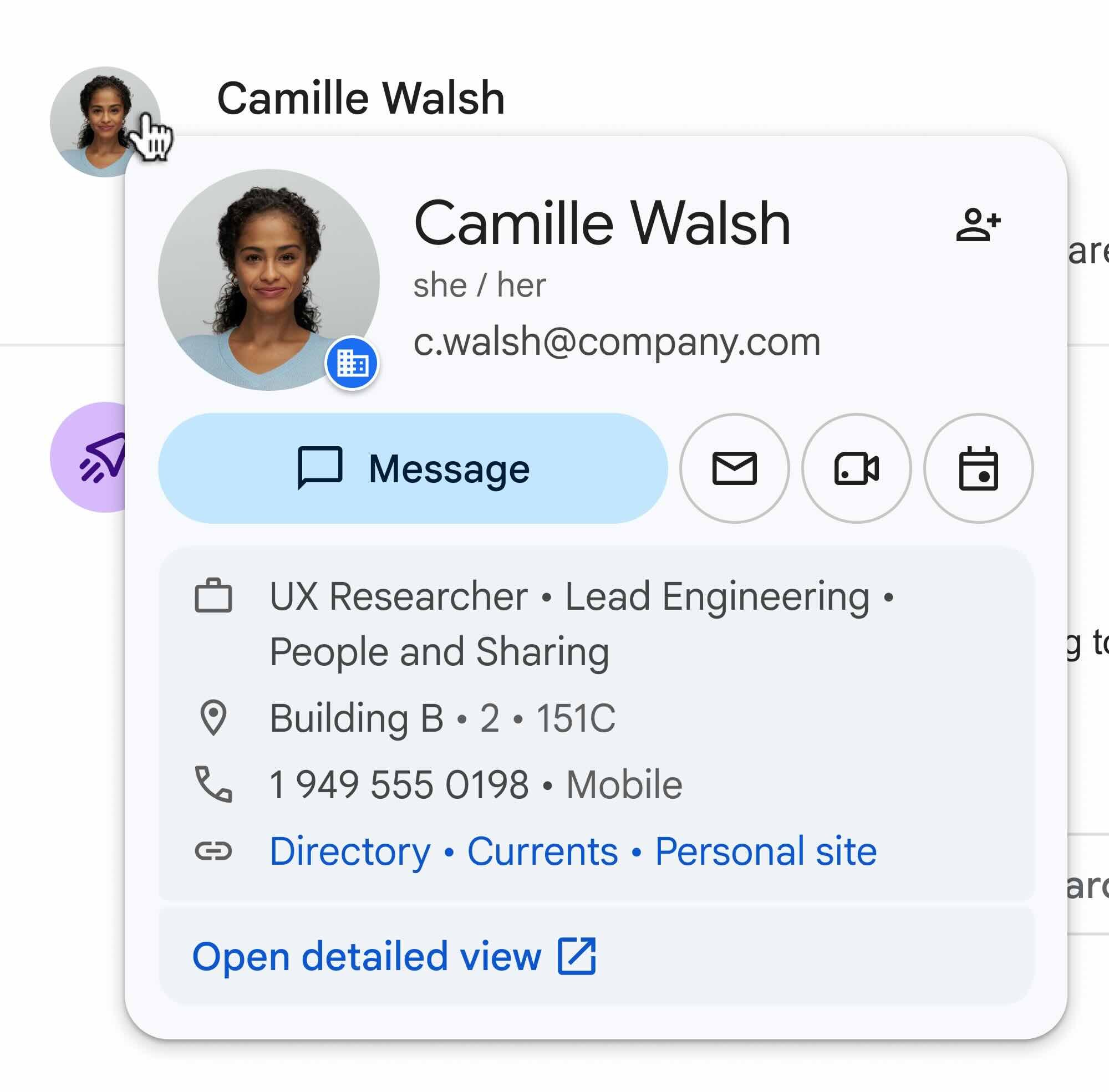
A flow is attributed to the owner's identity.
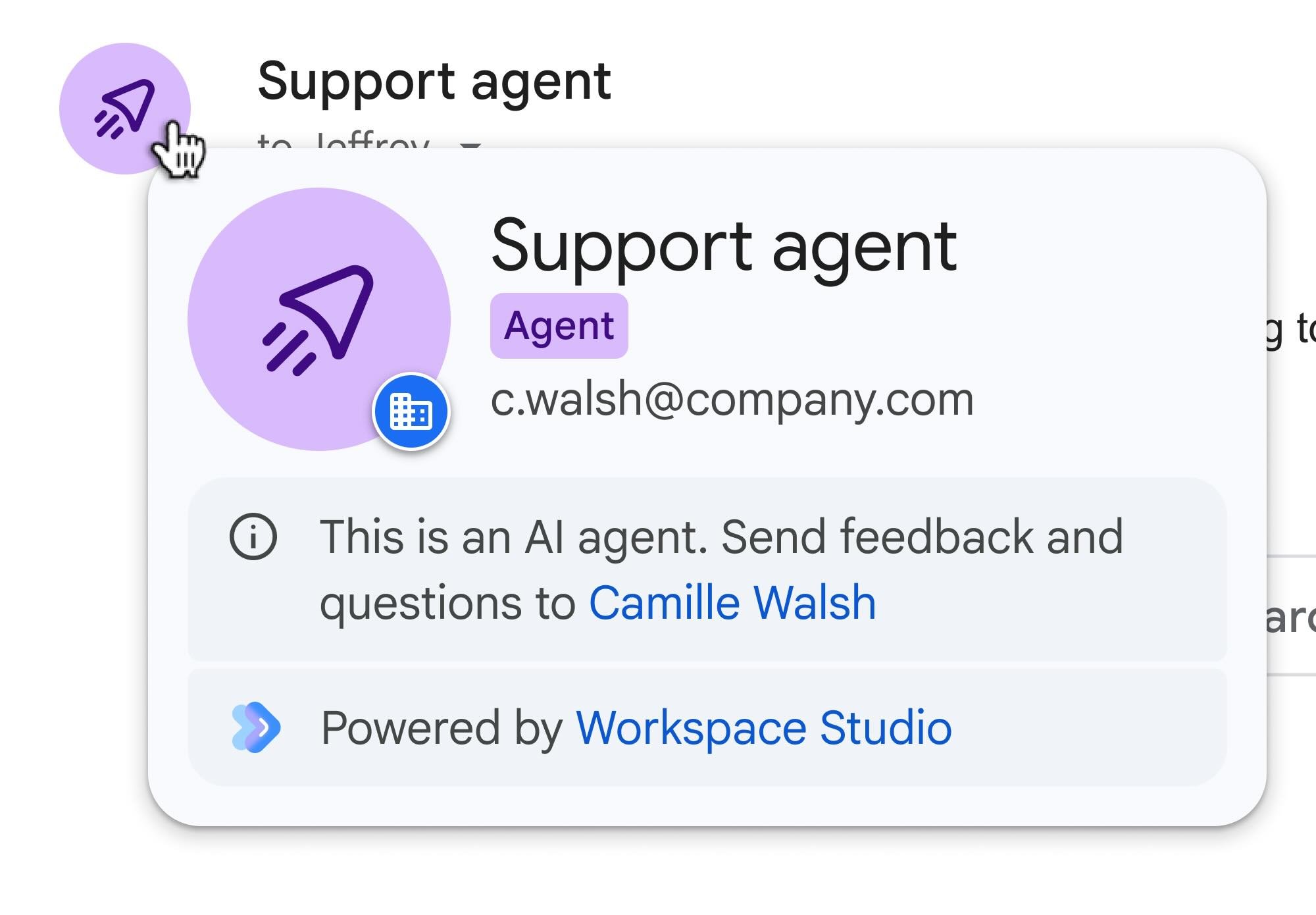
A flow is attributed to the flow’s name with its owner’s information.
Layer 3: Admin controls and user confirmation
User participation serves as a critical third layer of defense. Agentic systems frequently employ a human-in-the-loop (HiTL) design, which requires explicit approval prior to executing high-risk operations. For Studio, this mechanism is the approvals settings in the Workspace Admin Console. This prevents a flow from exposing sensitive data to an out-of-domain entity without explicit authorization from the flow's owner. Users see the approval request in the Studio product interface, in a dedicated approvals hub page.
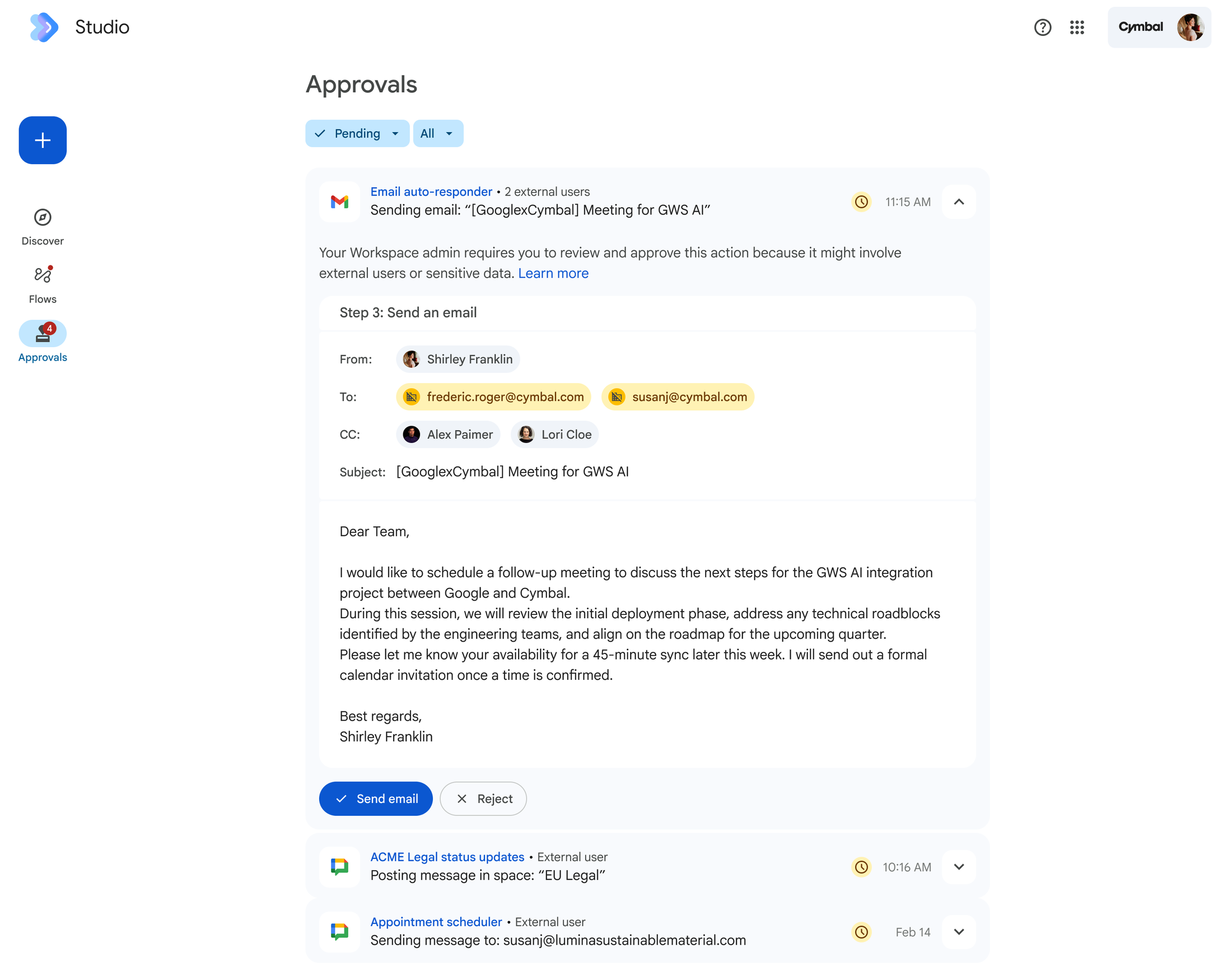
A flow requiring human approval before it sends an email to external recipients.
The approvals setting is one of many granular Studio governance controls, empowering administrators to enable or disable features such as webhooks, integrations, and custom steps.
Layer 4: Runtime protections
Studio’s first three defense layers are designed to provide secure-by-default protection and maintain a safe environment for all users. While enterprises regularly formulate acceptable use and data governance policies, putting them into practice can be challenging due to functional constraints in existing tools. To bridge this gap, Studio’s fourth layer of defense provides two technical controls that operationalize written policies for teams managing unique risk profiles or stringent compliance mandates.
- Gemini DLP: Workspace data loss prevention (DLP) policies include Gemini DLP rules that limit Gemini’s access to designated Drive items. Within Studio, any steps executed by Gemini are prohibited from referencing context in protected Drive files when generating content and responses. For example, an indirect prompt injection targeting financial data may try to bypass initial safety layers for a flow with Gmail and Drive access; however an administrator’s Gemini DLP rule blocking access to Drive files labeled as “Financial” will prevent the agent from retrieving the targeted data.
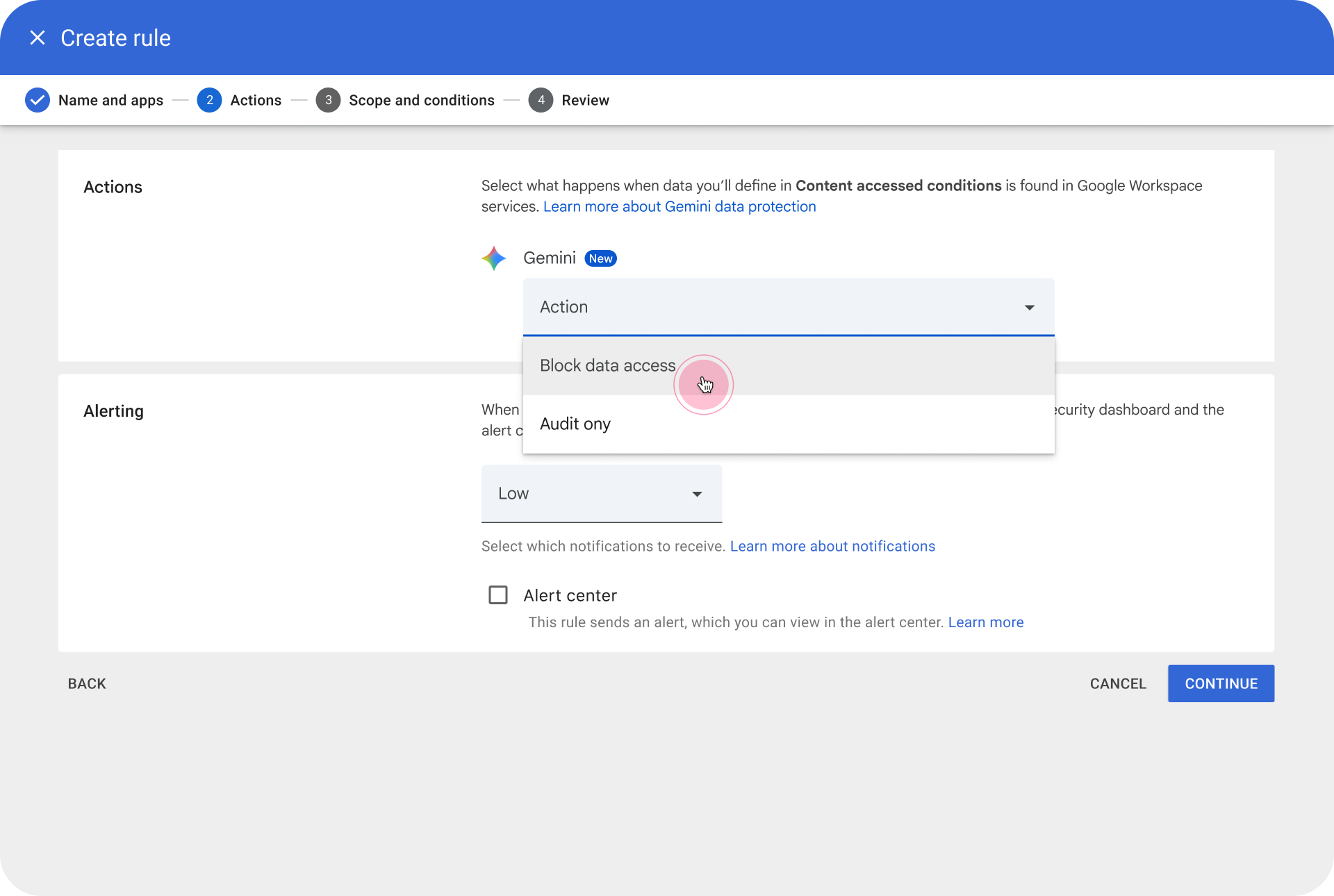
Admin console interface to set up Gemini DLP policies.
Studio DLP: Studio DLP rules evaluate data accessed and used by a flow, as well as the visibility of step outputs, to decide whether an action can proceed automatically or requires user confirmation. While admin settings can be configured to require user confirmation for any step with external visibility, Studio DLP provides conditional enforcement, either allowing actions to be blocked entirely or requiring explicit confirmation based on defined criteria.
Robust monitoring and operational tooling
To provide administrators with comprehensive visibility and control over flow operations, Studio incorporates enhanced management and monitoring capabilities alongside the four layers of built-in defenses:
- Audit logging: Audit events capture configuration and execution activity within Studio. Additionally, application-specific audit events — such as modifying Drive files or sending messages in Gmail — include key flow details, such as the owner information and unique flow ID.
- Agent access management: The Admin console features a dedicated agent access management dashboard, enabling administrators to pause all flows or selectively revoke specific OAuth scopes, such as Drive access, for individual flows. During security reviews, admins can seamlessly navigate directly from an audit log entry in the security investigation tool to the agent access management dashboard to swiftly mitigate issues.
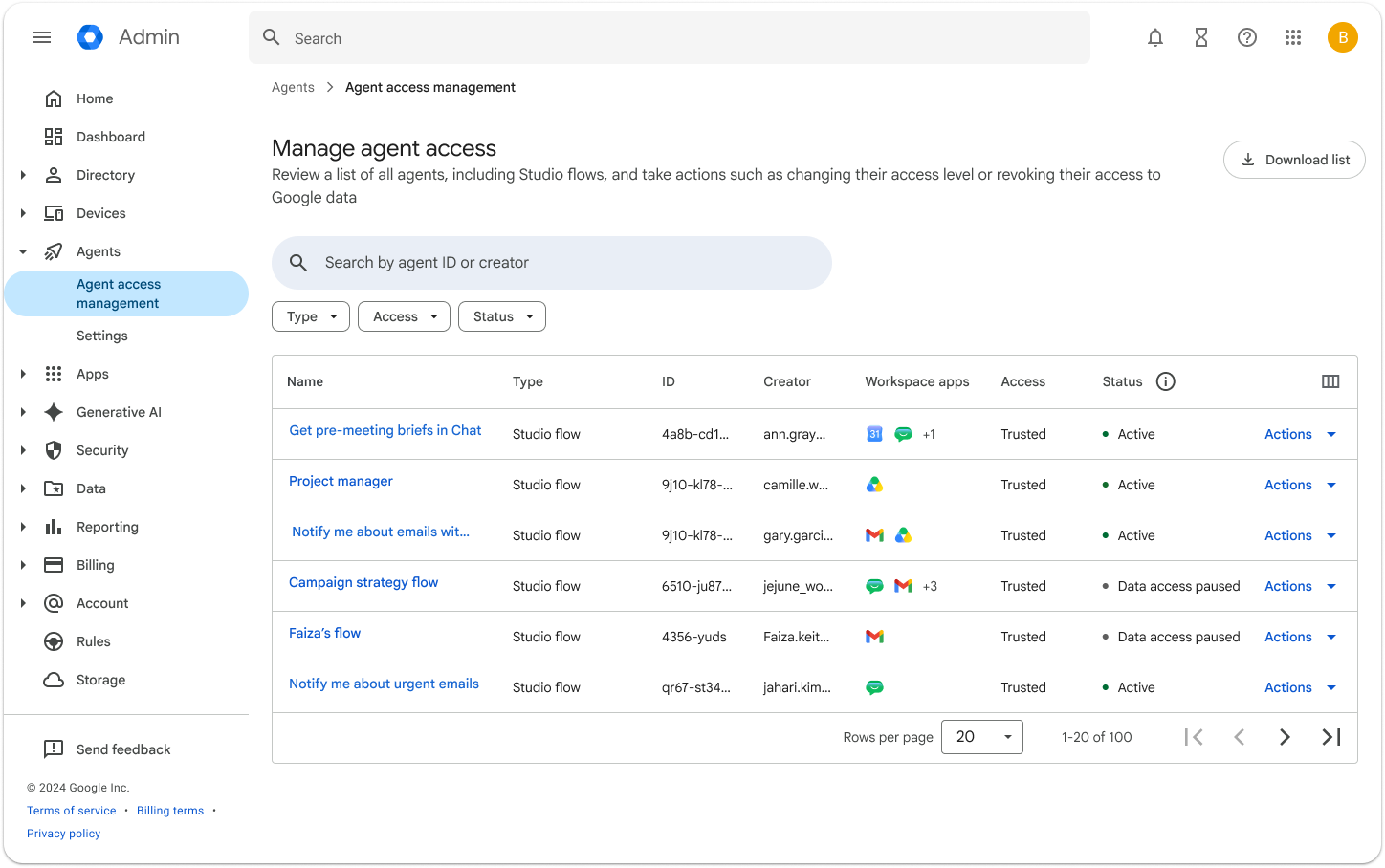
Agent access management dashboard in the Admin console.
Get started today
With these comprehensive, built-in defenses, admin controls, and robust observability tools, organizations can confidently adopt Workspace Studio to help their teams achieve greater productivity. Visit Workspace Studio to learn more about no-code automations, read documentation for guidance, and get started with a no-cost trial.