Experience easier migration and collaboration between Google Workspace and Microsoft 365

Ashish Gupta
Senior Product Manager, Google Workspace
Luke Camery
Director of Product Management, Google Workspace
Try Google Workspace at No Cost
Get a business email, all the storage you need, video conferencing, and more.
SIGN UPTo help organizations simplify the transition to Google Workspace, we are introducing major enhancements to data migration capabilities and Microsoft 365 interoperability. With these updates, IT teams can securely transfer sensitive information while allowing teams to collaborate, no matter if they are on Workspace or Microsoft 365.
Easily migrate data from Microsoft Exchange Online, SharePoint Online, OneDrive, and Teams
Updates to our cloud-native data import service help admins effortlessly migrate Microsoft 365 inboxes, calendars, and files — up to five times faster and at no additional cost. This includes custom configurations such as Outlook rules, calendar permissions, and shared mailboxes, mapping them directly to Workspace equivalents like Gmail filters and Google Groups.
In addition to mail and calendar data, data import can import SharePoint Online document libraries, OneDrive user files, and Teams channels and chat messages directly into Google Drive and Chat. Automating these complex mappings and preserving data fidelity helps organizations minimize downtime while reducing post-migration help desk tickets.
Using the data import tool for migrating files from Exchange Online, SharePoint Online, OneDrive, and Teams is now generally available.
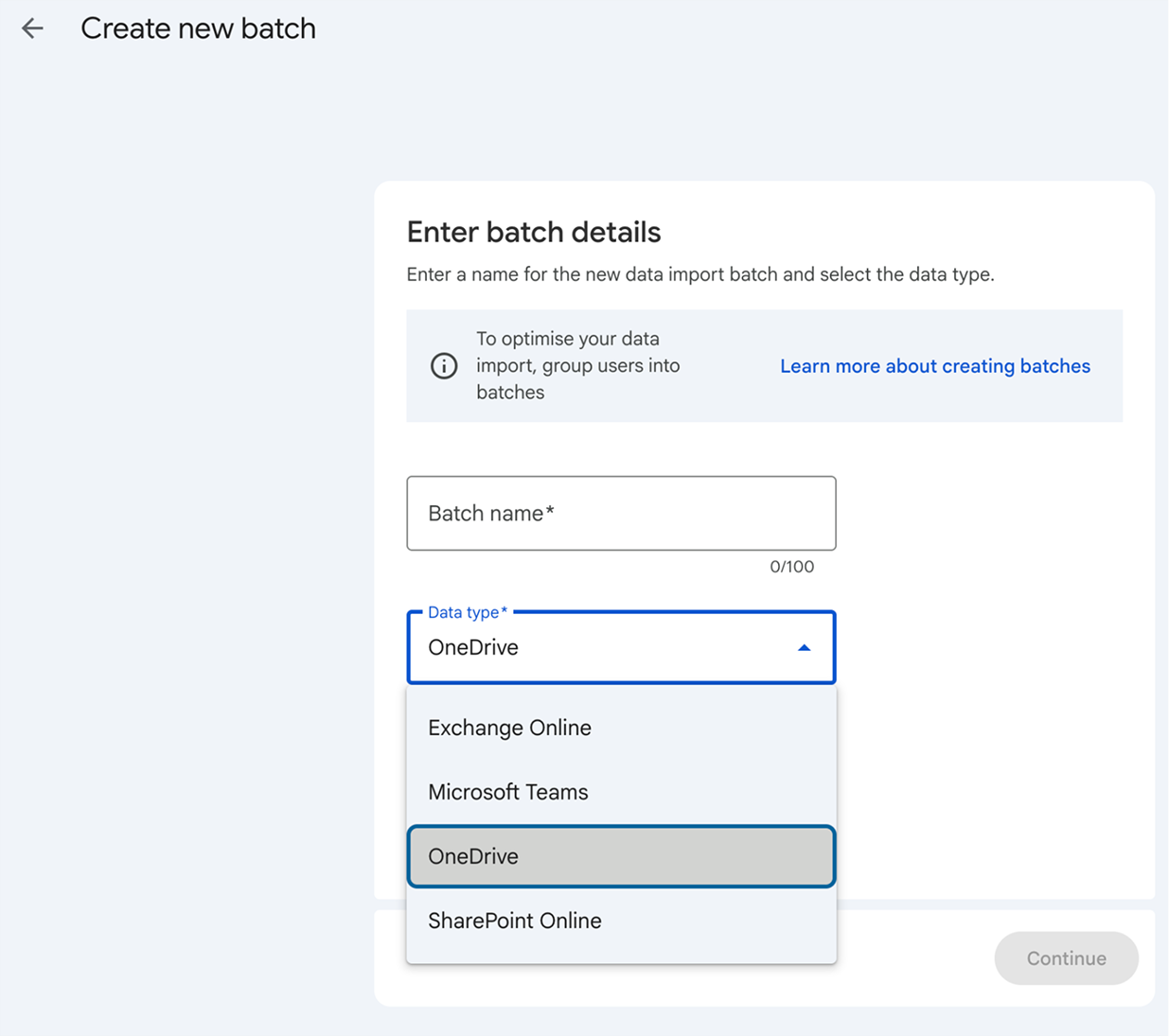
Data import interface in the Admin console shows batch creation options for Exchange Online, Teams, OneDrive, and SharePoint Online.
Keep your data secure and compliant during the migration
The data import tool will soon feature enhanced Exchange Online migration capabilities, allowing organizations to preserve Microsoft Information Protection (MIP) sensitivity labels and encrypted emails. Designed to keep compliance and security intact during the transition to Workspace, administrators can map MIP sensitivity labels to their Workspace equivalents directly in the Admin Console. During the migration, data import will automatically apply these corresponding Workspace labels to files and emails moving into Drive and Gmail, saving valuable administrative time and eliminating the need for manual re-classification.
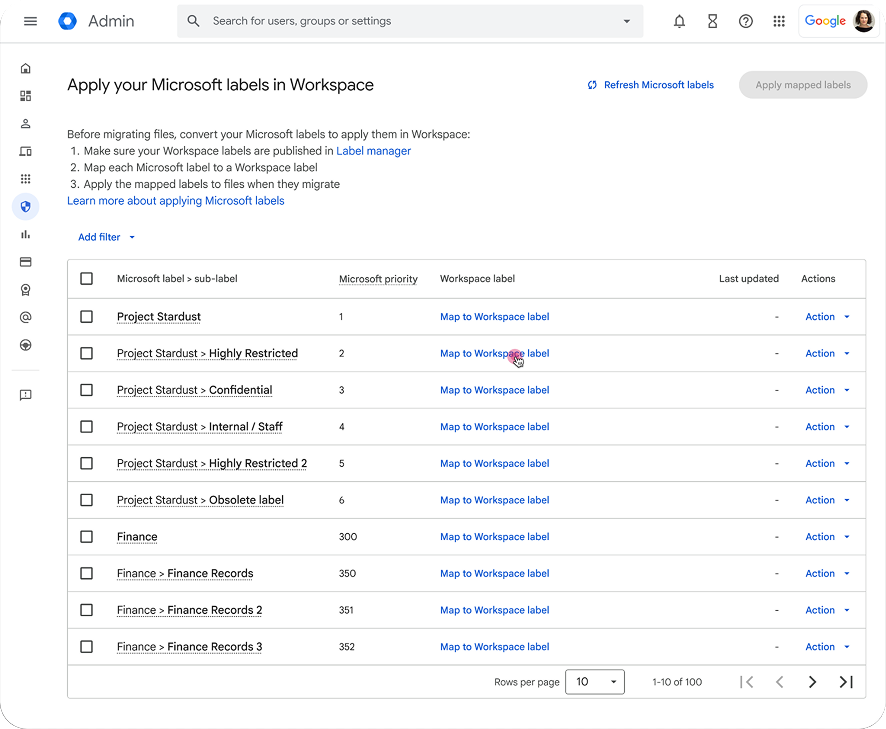
The Admin console shows options to map Microsoft Information Protection (MIP) sensitivity labels to Workspace labels.
Additionally, the data import tool will handle MIP-protected emails and files by decrypting them during the transition. These files are then either ingested directly into Gmail and Drive or re-encrypted using client-side encryption (CSE) to maintain enhanced data security and compliance standards. Both of these enhancements are scheduled to be generally available by the end of the year.
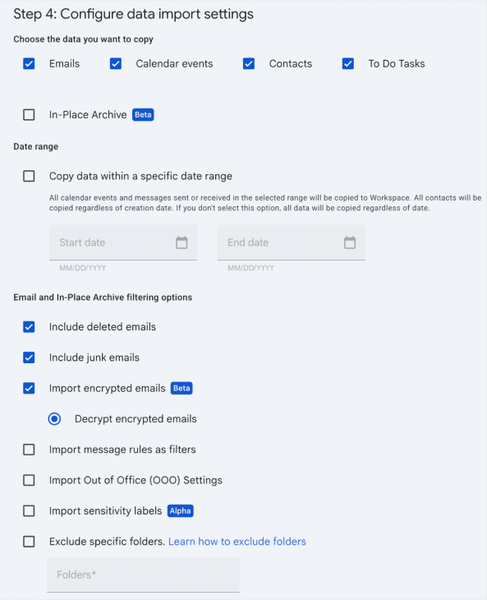
The data import settings screen showing options to configure date ranges, email filtering, encrypted email decryption, and import preferences.
Simplify collaboration with Microsoft 365 users with improvements to Gmail, Docs, and Sheets
We realize that migration is a major transition. To keep your team as productive as possible from day one, we are making it easier to work with Office files and use familiar features across Workspace.
Workspace already allows you to view and edit Office files directly within Docs, Sheets, and Slides without converting them first. Later this quarter, Office Editing Mode in Gmail will be generally available, letting you open Office attachments in Gmail and directly edit inside Sheets, Docs, and Slides. When you're done making changes, Gmail automatically drafts a reply on the thread with your updated file attached — so you don't have to download, rename, or re-upload any files.
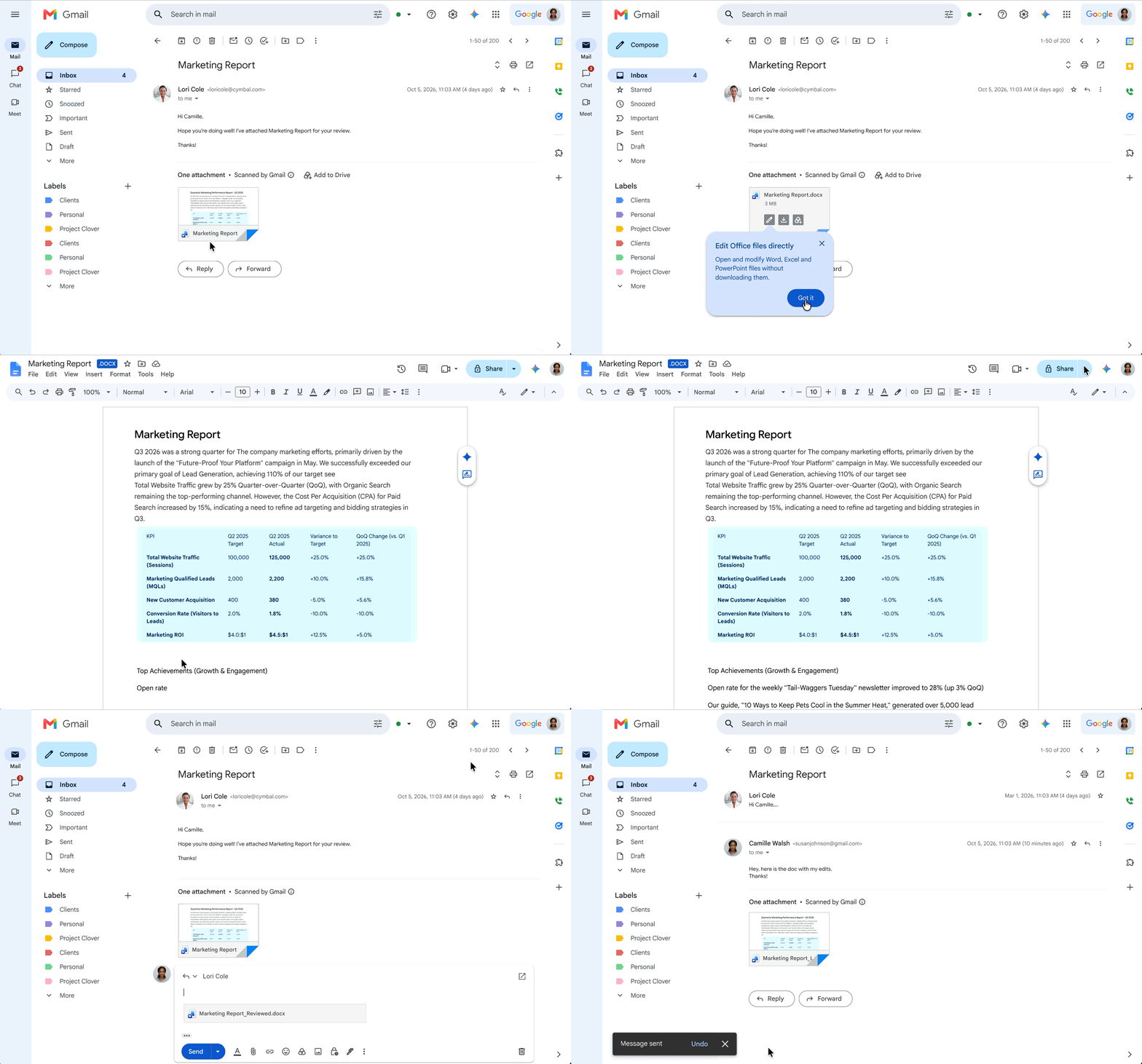
Office Editing Mode in Gmail allows users to open and edit a Microsoft Word attachment directly in Google Docs and automatically attach the updated file in a reply.
We’re also making document navigation easier with native support for Tables of Captions in Google Docs, now in beta. This feature automatically aggregates links to captioned items — like images, tables, and equations — so your documents stay organized without manual work. Plus, it seamlessly imports and exports as Tables of Figures in Microsoft Word to keep your layout intact across platforms.
Sheets also makes it easy for teams to keep analyzing data and building great reports when switching from Microsoft Excel:
- High-fidelity pivot tables: Preserve and reuse grouped pivot table fields during imports, and create custom formulas faster with an improved, more intuitive calculated fields editor.
- Advanced, brand-aligned charts: Import and create combo charts and multi-X scatter charts with zero formatting loss, and apply custom web fonts to match corporate brand guidelines.
- New manual calculation setting: Give power users full control over Sheets formula updates. Pause automatic recalculations to batch high-volume edits smoothly, stabilize volatile simulations, and run complex financial models without interruption.
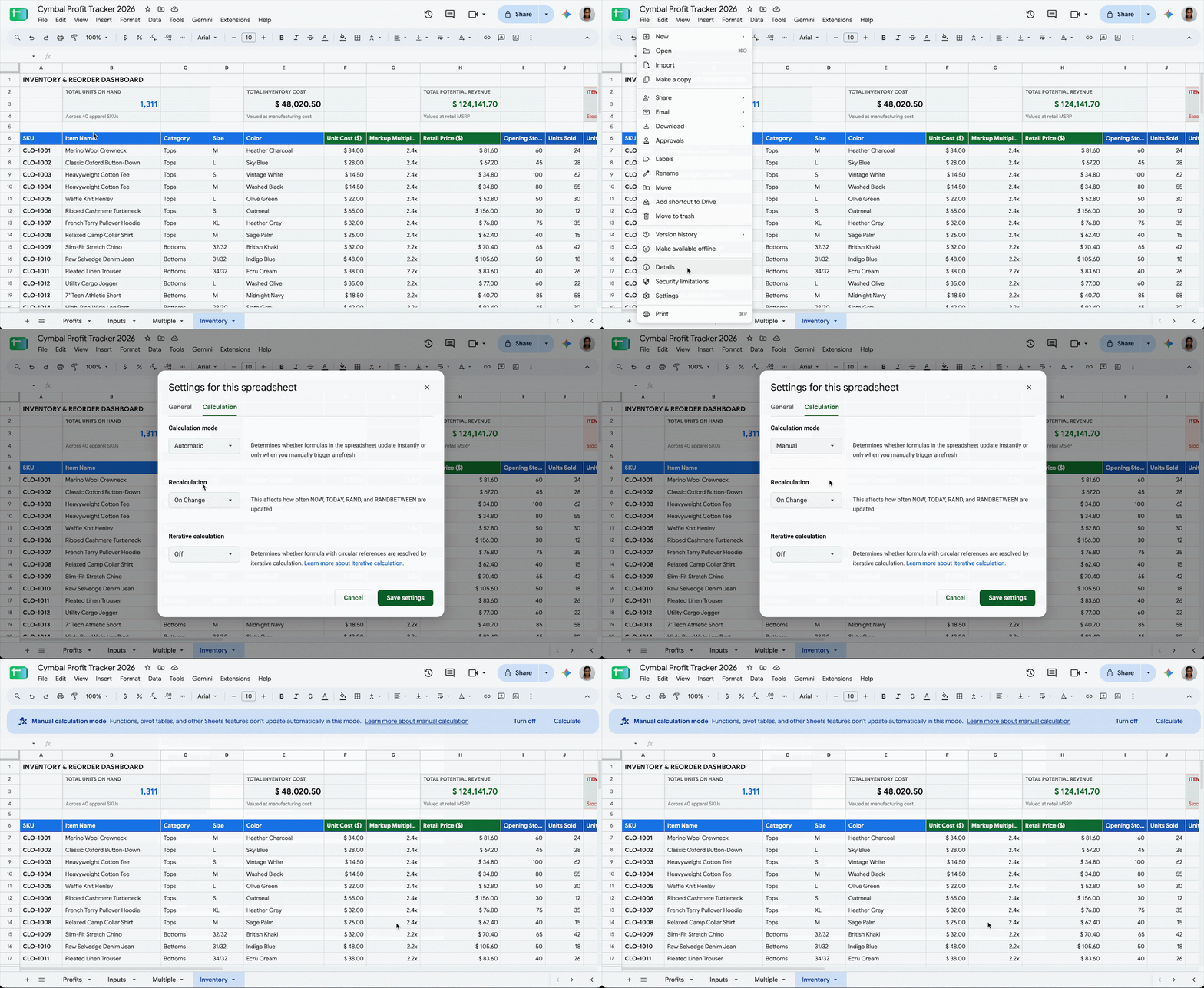
Enabling Manual Calculation Mode gives users more control over formula updates in Sheets.
Beyond new capabilities, we’re committed to ongoing performance improvements across Sheets. Cell capacity recently doubled to 20 million cells, and we’ll continue to optimize Sheets, so that it’s fast and responsive for your larger datasets.
Drive frictionless collaboration with Google Meet, now available on Cisco devices
Moving to Workspace doesn't require a costly overhaul of your existing meeting room devices. Your teams can soon run a native Meet experience on Cisco hardware, in addition to our other Meet hardware partners. For organizations considering a migration to Meet, this provides a no-cost hardware migration path, allowing you to deploy a fully featured, native Meet experience directly on your existing Cisco room equipment without purchasing new hardware.
By combining Cisco’s AI capabilities — such as AI Director and smart audio noise removal — with Gemini in Meet, your teams get an exceptional meeting experience while preserving effortless connectivity to Webex, Microsoft Teams, and Zoom as needed. Look for Meet on Cisco devices, rolling out before the end of the year.

The Google Meet experience is running natively on Cisco room hardware, showing a meeting room display with upcoming events and a desk device with an active video feed.
Get started today
Ready to simplify your transition and modernize your organization's collaboration stack? Head to the Admin console today to evaluate data import. To experience frictionless teamwork, try editing Office files directly in Workspace today — no license or file conversion required.