June Workspace Drops: New AI features to help you organize files, accelerate data analysis, and perfect your emails
The Google Workspace Team
Try Google Workspace at No Cost
Get a business email, all the storage you need, video conferencing, and more.
SIGN UPWelcome to our June 2026 Workspace Drop! This month, we're delivering more powerful, AI-driven features across Workspace designed to help you stay organized and keep your work moving forward.
Here’s what’s new:
- Tidy up your Drive faster than ever using Organize my files
- Accelerate data analysis by resolving formula errors with Gemini in Sheets
- Perfect your email drafts with an improved Help me write in Gmail
Tidy up your Drive faster than ever using Organize my files
Instead of manually dragging files into folders, let Drive do the work for you. The new Organize my files feature intelligently suggests the best folders for your loose files, or creates new ones to group related items. You’re fully in control of what suggestions to accept — whether you want to review them file-by-file or approve them in bulk to get organized fast.

Keep your Drive tidy with Organize my files in Drive.
Accelerate data analysis by resolving formula errors with Gemini in Sheets
Whether you’re building complex financial models or project trackers, a syntax typo or incorrect reference in a formula can stall your momentum. Gemini in Google Sheets can now remove the frustration out of troubleshooting formula errors.
When you encounter a formula error, click on the ‘fix’ button, and Gemini will automatically analyze your spreadsheet's surrounding data structure to identify the logical or syntax fault. Gemini will explain the issue and fix the formula inline where possible, reducing troubleshooting time so you can focus on analysis and insights.
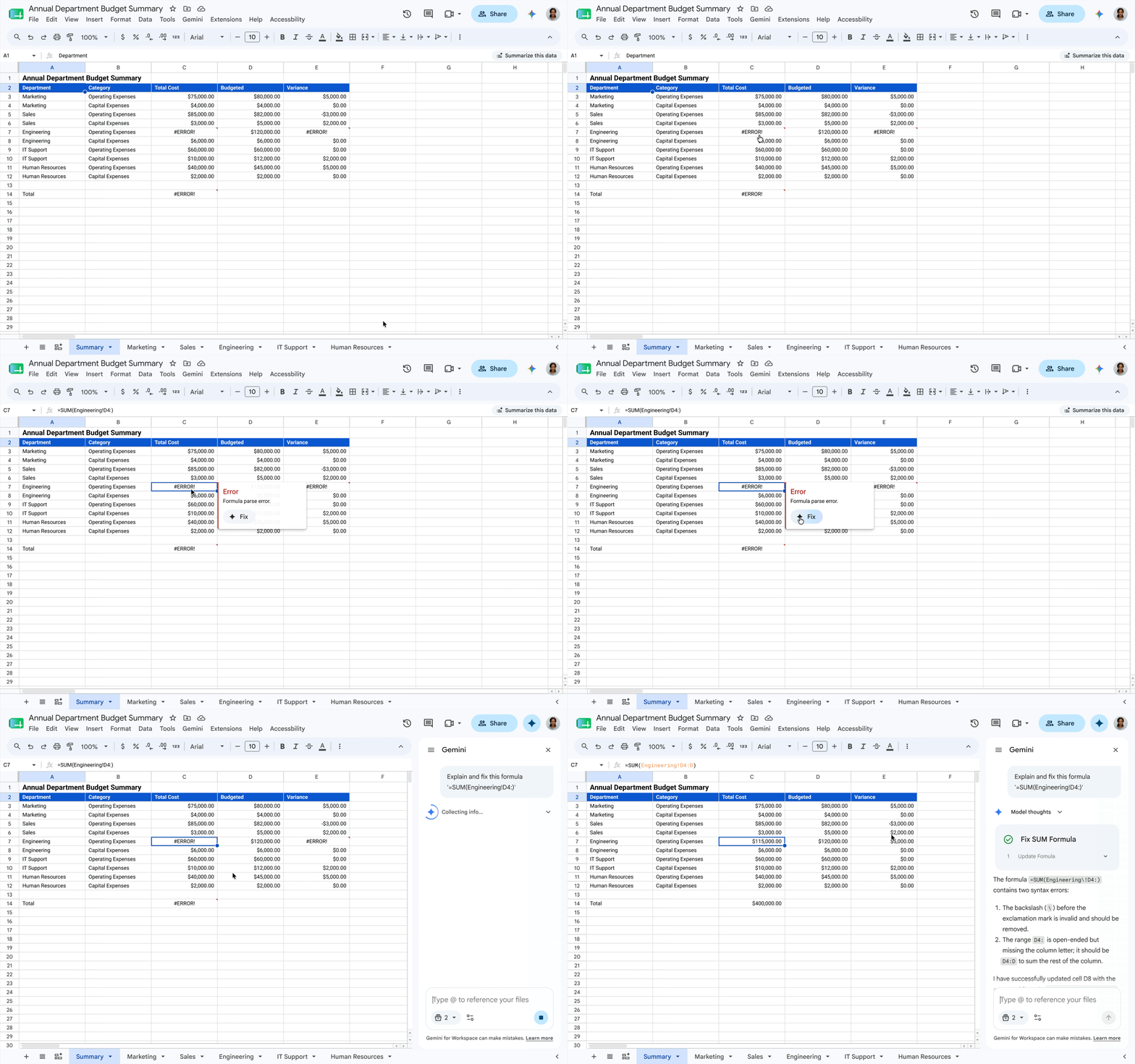
Troubleshoot formula errors quickly with Gemini in Sheets.
Perfect your email drafts with an improved Help me write in Gmail
Help me write in Gmail now helps you craft the exact message you need. Just prompt Help me write as you normally would for your first draft. If the result isn’t perfect, you can now use the prompt bar to make specific edits. Whether you need to add a missing detail to the second line or include a deadline for your request, simply type the instruction and Gmail will instantly update the draft for you.

Craft the perfect message with an improved Help me write.
Additional features with expanded availability
Alongside this month's additions, we’re also expanding availability and global access to several recently introduced features:
- AI Inbox is now available for most Google AI Ultra, Pro, and Plus subscribers, as well as Google Workspace Enterprise Plus customers on Gemini Alpha
- You can now build and edit spreadsheets in 28 additional languages, including Spanish, Japanese, Portuguese, French, German, Italian, and Korean and more.
Get started today
These updates are rolling out to Google Workspace customers now. Learn more about unlocking the power of generative AI with Workspace.