May Workspace Drops: Turn raw data into tables, create new AI voiceovers, and customize your AI meeting notes
The Google Workspace Team
Try Google Workspace at No Cost
Get a business email, all the storage you need, video conferencing, and more.
SIGN UPWelcome to May’s Workspace Drop! Over the past few months, we’ve announced dozens of advanced capabilities coming to Workspace, including reimagined content creation, Workspace Intelligence, plus everything we announced at Google Cloud Next.
Now, many of these highly anticipated features are generally available for Workspace customers:
- Gemini in Slides: Generate editable slides.
- Vids: Create custom branded avatars.
- Gemini in Sheets: Build and edit spreadsheets, solve advanced optimization, and automate data entry using Fill with Gemini.
- Gmail: Help me write with personalization. Search faster and smarter with AI Overviews.
- Gemini in Docs: Go from blank page to brilliance with Help me create, Help me write, and Match writing style.
- AI security: Securely manage AI and agent access to Workspace data with AI control center.
We’re also delivering a new set of enhancements this month, all of them generally available:
- Create engaging videos seamlessly with new AI voiceovers and simplified screen recording in Vids.
- Surface insights faster by converting raw data to tables in Sheets and detecting anomalies in Connected Sheets
- Manage your communication channels better in Meet and Chat
- Unlock greater productivity and creativity with Gemini Omni in the Gemini app.
Create engaging videos seamlessly with new AI voiceovers and simplified screen recording in Vids
Bring videos to life with new AI voiceovers: Powered by our new Gemini 3.1 Flash text-to-speech model, AI voiceovers in Google Vids now feature 30 new conversational options designed for greater realism and natural expression. Bring these new voices to life in your next video project by adding emotional prompts like "Read this like you're excited," pacing adjustments like "[pause]," or sound effects like "[laugh]." And to help you deliver your videos globally, all voiceovers have expanded to support 24 total languages, including Arabic, Hindi, Dutch, and Vietnamese, alongside the existing core languages.

30 new conversational voice options available in Google Vids voiceovers.
Record and share videos with Vids screen recording: The new Vids Screen Recorder Chrome extension captures your screen and camera with a single click so you can create tutorials, feature walkthroughs, or project feedback right from your browser toolbar. The extension allows you to record high-quality videos up to 30 minutes long as often as you need, and you can easily share your video with just a link.
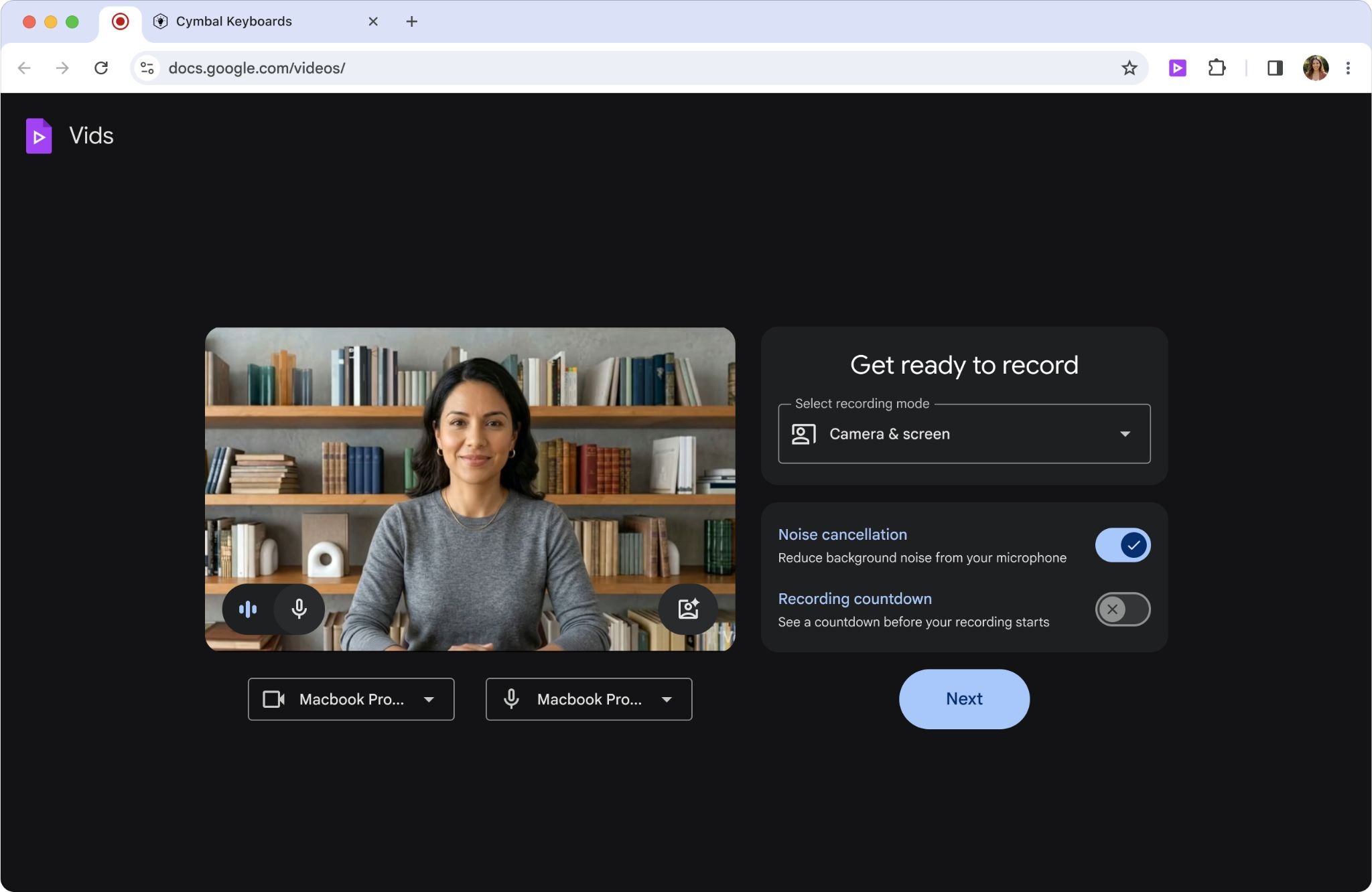
Capture your screen and share your ideas using the new Google Vids Screen Recorder Chrome extension.
Surface insights faster by converting raw data to tables in Sheets and detecting anomalies in Connected Sheets
Create tables from raw data instantly in Sheets: Manually formatting raw data in a spreadsheet can be tedious and time consuming. Now, when you paste content like freeform text, bulleted lists, or JSON, Google Sheets will surface a Convert to table button. With a click, Gemini will structure your content into organized tables, eliminating manual data entry and formatting so you can focus on data analysis.
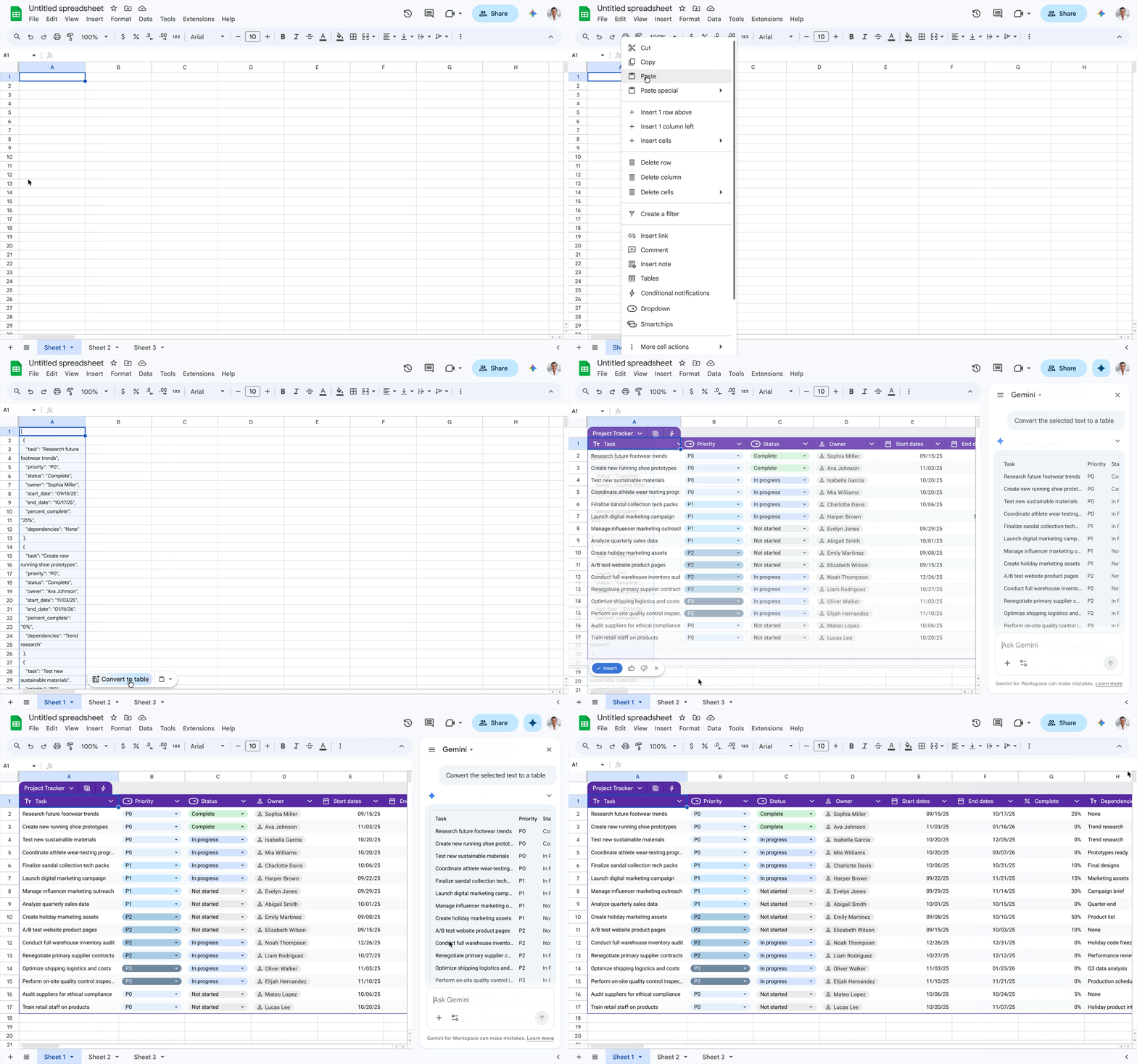
Convert unstructured text into organized tables with “Convert to table.”
Surface critical insights in Connected Sheets: We’re also enabling powerful analysis — without the required effort and expertise — with anomaly detection in Connected Sheets. Powered by BigQueryML and TimesFM, anomaly detection helps you identify trends or outliers in your data without you having to manually train your model or learn SQL. Whether you’re trying to spot supply chain bottlenecks or billing irregularities, anomaly detection in Connected Sheets shortens the path from raw data to actionable AI insights.
Manage your communication channels seamlessly in Meet and Chat
Customize your AI-generated meeting notes: Take full control over how your meeting insights are captured with an improved Take notes for me in Meet. You can now customize your notes in real time by using the in-call menu to toggle specific sections (Summary, Decisions, Next Steps, and Details) on or off for your current meeting without affecting default settings. This update also includes a new “Decisions” section designed to capture and track outcome statuses like Aligned, Needs Further Discussion, Disagreed, or Shelved. Additionally, the improved Summary section has been streamlined to be more concise and scannable, making it quicker and easier than ever to catch up on key takeaways.
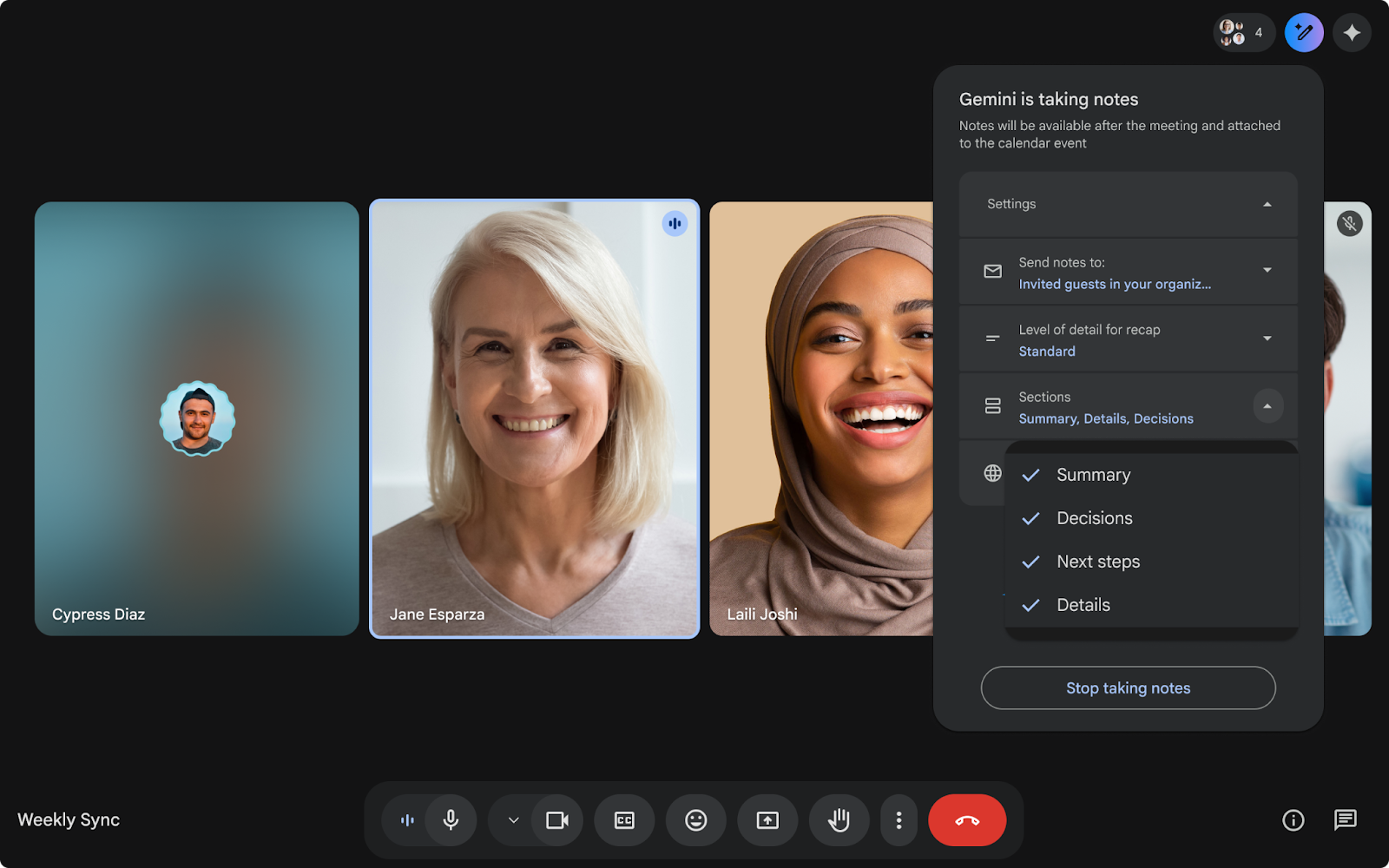
Customize which sections are enabled in-call with Take notes for me in Meet.
Join meetings effortlessly in Meet: We’re breaking down physical collaboration barriers by enabling you to join meetings seamlessly from your personal device. The “Connect room” feature identifies nearby Google Meet hardware and prompts you to connect instantly so there’s no need to manually type in a meeting code.
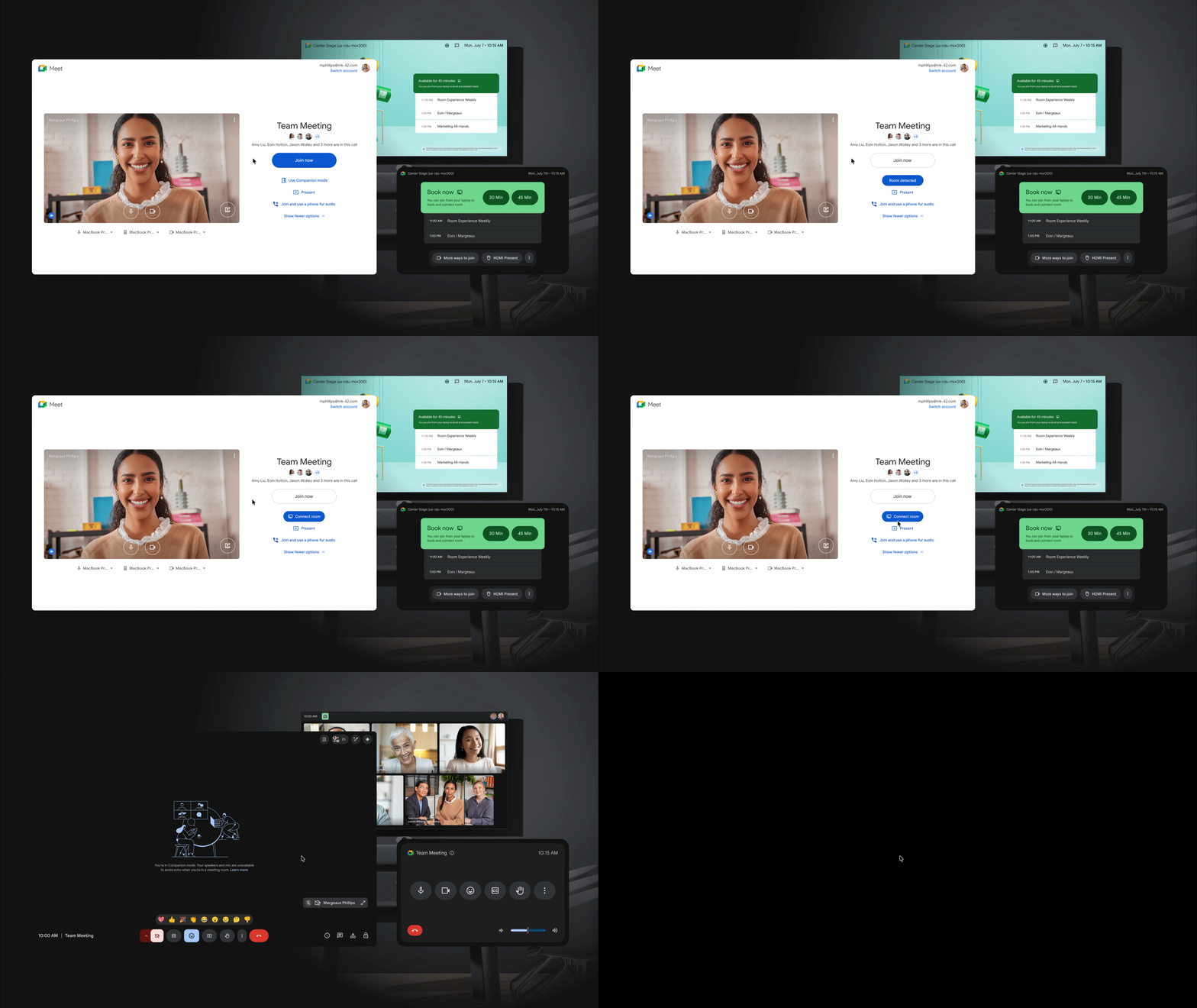
Connect to your Google Meet hardware instantly with “Connect room” in Meet.
Break meeting language barriers: In addition to in-person meetings, we’re also enabling speech translation on mobile (IOS and Android), helping global teams communicate more naturally and removing language barriers.
Chat securely with Guest accounts: Need to collaborate and communicate securely with external stakeholders? Guest accounts enable organizations to message and share documents with non-Workspace customers, partners, and vendors. With guest accounts, organizations are able to extend their organization's security and data protection policies to these external users. By adding a non-Workspace user in a direct message (DM) or space in Chat, a new guest account is quickly provisioned and ready to use.
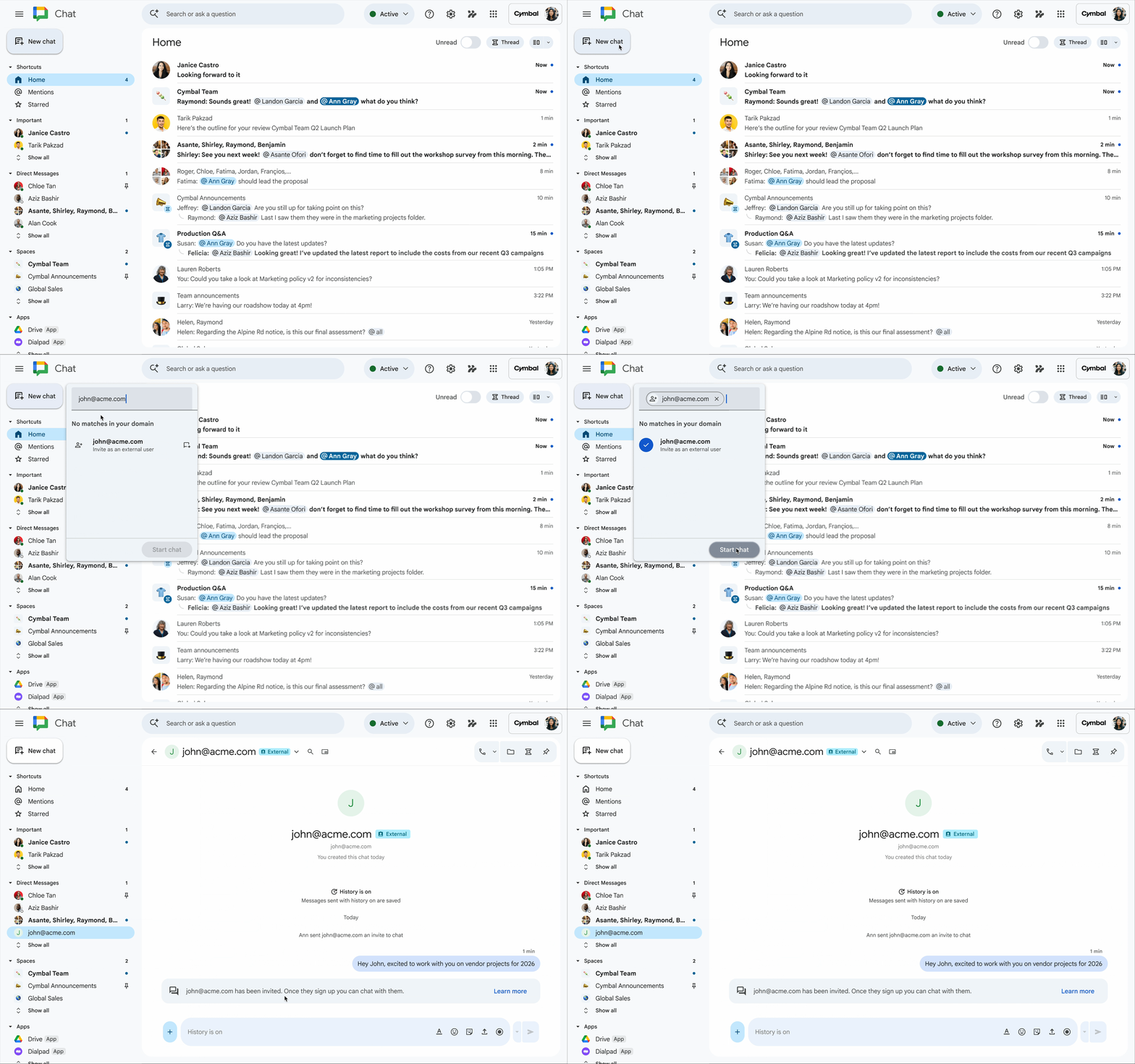
Easily provision a new guest account directly in Chat for secure collaboration with non-Workspace users.
Unlock greater productivity and creativity with Gemini Omni in the Gemini app
Take your ability to create further with Gemini Omni, where Gemini’s ability to reason meets the ability to create. Omni is our new model that can create anything from any input — starting with video. With Omni, you can combine images, audio, video and text as input and generate high-quality videos grounded in Gemini's real-world knowledge. You can also easily edit your videos through conversation.

Get started today
These updates are rolling out to Google Workspace customers now. As always, you can learn more about unlocking the power of generative AI with Workspace.