How AI can help make work more neuro-inclusive
Sarah Greenberg
Vice President, Expertise and Behavioral Health Innovation, Understood.org.
Alexander Hauerslev Jensen
Accessibility Program Manager, External Engagement (North America) for Google
Try Google Workspace at No Cost
Get a business email, all the storage you need, video conferencing, and more.
SIGN UPMany of us struggle to stay focused during the workday. Dozens or hundreds of emails, chats, and texts compete for our attention, not to mention the relentless drumbeat of meetings wedged into our calendars. For about 20% of the population who are neurodivergent, many experience these demands as more intense.
No matter how our individual brains process information, we all share what experts call executive function. It’s the project manager in our heads that helps you prioritize, plan, focus, and get things done. When the project manager gets overwhelmed, the noise of all those distractions gets louder and work gets harder.
Understood.org supports individuals navigating a world not designed for their brain, or their child’s, such as those with ADHD and dyslexia, so that they can thrive at school, work, and in life. Understood reaches more than 20 million people annually with expert-driven tools and resources, a vast content library, a global podcast network, and more. The organization recently partnered with a team at Google to explore how widely available AI tools that already exist in the spaces where we work — such as Google Workspace with Gemini — can help people overcome executive function obstacles, do their best work, and reduce barriers to workplace success, ultimately making work more neuro-inclusive. Below are a few of the takeaways. And if you’d like to download the full neurodiversity guide to effective work, you can find it here.
Understanding executive functioning challenges
We all face executive function challenges. Every brain struggles at times to manage priorities, stay focused, and organize tasks. But some experience a more consistent struggle, meaning the capacity of their brain’s internal project manager can get in the way of their goals. Executive function challenges aren’t about general intelligence — you can be extraordinarily intelligent but still struggle to complete work tasks on time. Dr. Thomas E. Brown, renowned psychologist, author, and long-time Understood.org expert, developed a framework for understanding executive function challenges. While it was developed with a focus on ADHD, most will find it relevant to daily work life. The model breaks down executive functioning into the following categories:
- Activation: Organizing and prioritizing your workload and getting started on tasks even when you don’t feel motivated.
- Focus: Sustaining your attention on a task, shifting focus when necessary, and filtering out distractions.
- Effort: Regulating alertness, sustaining effort, and processing speed.
- Memory: Holding information in your mind to use it (working memory) and accessing what you’ve previously stored when you need it (recall).
- Action: Monitoring your own behavior, controlling impulsive speech or actions, and adjusting course.
- Emotion: Managing feelings of frustration, worry, or disappointment so they don't derail you from your work.
AI tools can serve as a game changer for those with executive dysfunction. Below, we share how AI can generally support executive function and include some specific features in Google Workspace with Gemini that can help.
Kickstarting activation
If you’ve ever stared at a blank document for an hour, you’ve felt a "lag" in activation. This is the mental effort required to start a task. AI is powerful for generating an initial draft or outline.
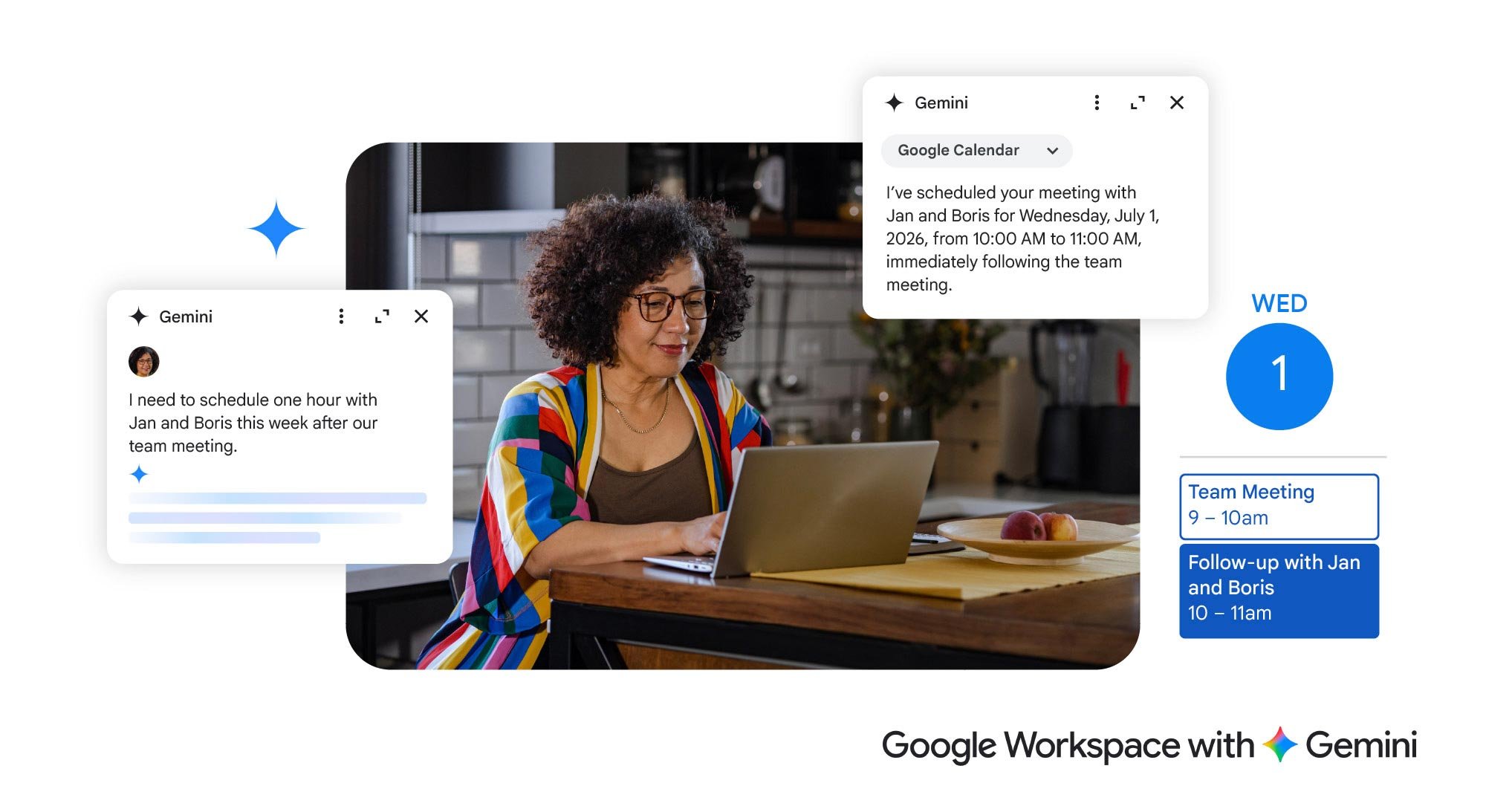
In Workspace, you can ask Help me create in Google Docs to take a first pass, even grounding it in files related to the project. Or if you’re struggling to find a time when you can meet with colleagues, Gemini in Calendar can act as your scheduling assistant. Instead of wrestling with time slots, tell Gemini “I need to schedule one hour with Jan and Boris this week after our team meeting” and let it find the gaps for you.
Staying focused
For many, the challenge isn’t just starting; it’s staying on track. New developments in AI mean that you can get help managing your calendar to stay focused when you’re working alone or with others in a meeting.
For example, if you block Focus Time in Google Calendar, it automatically mutes notifications in Chat to reduce distractions. And if you struggle to listen and take notes at the same time, Google Meet’s Take notes for me lets you stay engaged in the conversation while Gemini captures the details. Then it emails all the attendees the organized notes after the meeting, complete with summaries and action items.
Context switching is another drain on focus. If you’re jumping between projects and conversations, ask the Gemini side panel in Chat to "Catch me up on the latest messages in this thread" so you don’t have to scroll through the backlog of messages.
Managing your energy
Managing your mental energy is like managing a battery. Some tasks drain it faster than others. AI can help you "offload" the tedious stuff so you can save your energy for the big ideas or deep thinking.
For example, you can ask Gemini in Workspace to summarize long email threads or complex documents, asking it to “Give me the three most important points.” And because some people prefer different formats, like audio or visual, and many benefit from varied modalities, you can use tools like Gemini Notebook to convert a series of sources — blogs, research reports, presentations — into a podcast, mind map, or infographic.
Supporting your working memory
Working memory is what allows us to hold onto information in the moment. When it’s overtaxed, details slip through the cracks. AI can help.
In meetings, for example, Gemini can help us retain more with closed captions and by generating transcripts, so we can refer back for anything we’ve missed. AI-powered search in Drive has also made remembering the exact file names for the project you’re working on less important. Ask Gemini in Drive: "Find that budget spreadsheet from last month with the green charts." You don't need to remember the title — just the context.
Communicating and acting with intention
Navigating workplace social cues and tone can be stressful. Sometimes we need help making sure the tone of our email matches our intention, or that we’re contributing to a meeting in the most productive way possible.
Gemini can act as a "tone check" to ensure your message is received exactly how you intended. Before sending a difficult email, ask Gemini: "Does this sound professional and constructive?" or "How can I phrase this project delay to leadership so it sounds proactive?" And if you’ve ever hit send before and then regretted it, know that you can adjust Gmail to have a 30-second delay, just to give you an extra beat of reflection. In meetings, try the hand-raising feature in Meet to signal you have something to say. This helps manage the flow of conversation and ensures everyone’s voice is heard without the stress of "interrupting."
There are dozens more tips in our guide: A neurodiversity guide to effective work
Better for everyone
Making work more neuro-inclusive not only helps those who identify as neurodivergent, it also helps every single employee, and every team, reduce barriers to doing their best work. Diversity of learning and thinking is as critical to society as biodiversity is for the planet. We need team members who think differently. AI can help personalize work to fit your neurology in small but meaningful ways, which really add up to big change over time. When an entire workplace culture embraces difference, everybody wins.