How AI is helping me have better meetings
Laura Mae Martin
Executive Productivity Advisor, Google
Try Google Workspace at No Cost
Get a business email, all the storage you need, video conferencing, and more.
SIGN UPSome of us remember what it was like to join a meeting by dialing into a teleconference line, muting yourself, and awkwardly trying to jump in when you had a question. Thankfully, as remote and hybrid work took off and teams became more distributed across time zones, meetings became more collaborative with videoconferencing, allowing everyone to fully participate, no matter their location.
But as evolved as meetings have become, we should remember to ask ourselves: “Why are we meeting in the first place?”
At its heart, a good meeting should bring people together to achieve a specific goal. Now, with AI tools like Gemini in Google Meet, getting to that goal is easier than ever. Here’s how AI is helping me have better meetings.
Set meetings up for success
Getting a meeting on the calendar can take more time than the meeting itself. But AI helps me simplify that process. Built with Gemini, Help me schedule in Gmail suggests optimal meeting times based on attendees’ Calendars and the context of our email thread. This gives me time back before the meeting even starts.
I use that time to prepare so I can show up ready to collaborate. Gemini helps revisit past meeting notes, surface outstanding action items, and identify what needs further discussion. The Brainstormer Gem can suggest agenda topics based on my goals, and it can even help shape the flow of the conversation. This sets the stage for a clear and intentional meeting.
Let AI handle the busywork so you can stay engaged
Brainstorming can be hard when I’m trying to take notes and keep up with a rapidfire conversation. Gemini takes that work off my plate. It captures notes, generates captions, translates in real time, and keeps track of the discussion. If I join a meeting late or miss a beat as ideas fly, Ask Gemini in the Meet side panel can bring me up to speed without disrupting the flow.
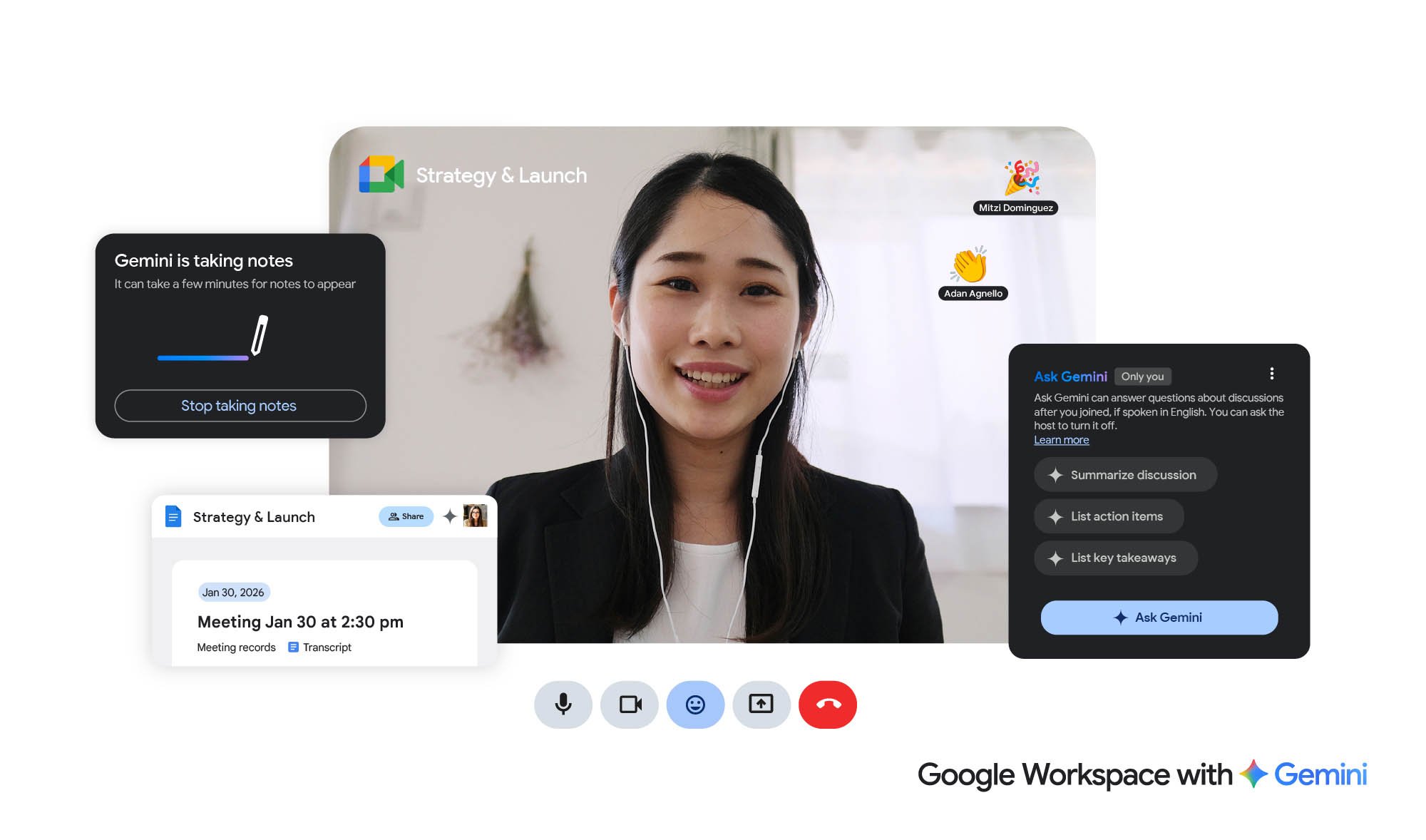
Focus on the conversation. Let Gemini take the notes.
Keep everyone on the same page after the meeting ends
The end of a meeting shouldn’t mean the end of momentum. AI-generated notes help us turn meetings into game plans. With Take notes for me in Meet, Gemini can share notes and action items through Gmail and attach them to the Calendar invite, so my team has access afterward.
Instead of eight people walking away with eight different interpretations, there’s a single, shared source of truth. This reliable foundation can reduce follow-up emails and cut unnecessary meetings.
My team spends less time asking “What did we decide, again?” and more time acting on those decisions. And when we’re all clear on our responsibilities and timelines, work can move faster without constant check-ins.
I often use those notes as a springboard for Gemini. I’ll ask it to turn them into suggested updates for a Slides presentation, or refine a plan while the discussion is still fresh. It’s a simple way to keep the momentum of the meeting without starting from scratch.
Smarter meetings, better work
Meetings have come a long way. And now AI supports them as the productive workspaces they were always meant to be — bringing people together around ideas, decisions, and clear paths forward. When AI keeps us all in the loop and provides shared context, people can spend more time contributing, deciding, and getting things done.
Next time you schedule a meeting, think of AI as your capable meeting assistant that helps everyone walk in prepared and leave aligned and motivated. If a meeting is worth scheduling or accepting, it should set us up to do our best work.
Download our ebook on having better meetings, or watch for our webinar.