Scale your team’s best work with skills in Gemini: top use cases by role
Deanne Chen
Google Workspace with Gemini Product Marketing Manager
Try Google Workspace at No Cost
Get a business email, all the storage you need, video conferencing, and more.
SIGN UPWriting a great AI prompt helps you once. Turning your team’s best practices into skills in Gemini helps every teammate deliver high-quality work with less manual effort.
To help your teams see concrete AI use cases for their daily work and find inspiration for getting started, check out these two new role-specific resources:
- Skills in Gemini 101 handbook: A quick-start guide to skills in Gemini, complete with top use cases by role and starter prompts.
- Day in the life with Gemini infographics: A visual overview of how sales, finance, marketing, HR, customer service, and knowledge workers use skills in Gemini alongside Google Workspace apps throughout their workday.
What are skills in Gemini, and why are they useful for teams?
Skills in Gemini are reusable custom instructions that teach Gemini how to handle your specific tasks or prompts. Think of a skill as a saved shortcut across Gemini and Google Workspace apps like Google Docs, Gmail, Google Sheets, Google Slides, and more, helping whole teams save time with repeatable workflows.
Instead of team members retyping lengthy prompts or attaching references every time they start a chat, skills help:
- Turn prompts into shortcuts: For example, save a prompt that you used to pull from meeting notes, emails, and chat threads as a skill to draft your report every week in a standardized format. This can condense an hour of work into a few minutes with only a bit of setup time.
- Stack and automate skills in any workflow: Trigger a skill with “@” in Gemini, then use multiple skills together in one chat, or let Gemini automatically apply relevant skills when needed.
- Scale expertise and best-practice processes: Turn your top performers’ know-how and standard operating procedures into shared skills so every teammate delivers consistent, high-quality results with less busywork.
Top use cases for skills in Gemini by role
One of the biggest barriers to AI adoption is knowing where AI fits into your specific role. When teams see examples for their everyday tasks, it’s easier to get inspired and customize skills to amplify their impact. Here are a few highlights in the Skills in Gemini 101 handbook:
- Knowledge workers → Streamline project management: Trigger @Status-Update-Generator to scan docs, emails, and notes to compile weekly wins, blockers, and next steps.
- Sales → Accelerate account research and deal cycles: Use a @Prospect-Researcher skill to synthesize financial filings like 10-Ks and Google Drive call transcripts into a comprehensive discovery brief.
- Finance → Turn complex models into executive narratives: Customize a @Financial-Storyteller skill to translate complex forecast models in Sheets into board-ready summaries or presentations.
- Marketing → Scale on-brand content creation: Create a @Brand-Voice-Enforcer skill to audit new blog drafts in Docs against your official messaging guidelines.
- HR → Simplify recruiting processes: Use a @Panel-Interview-Synthesizer skill to compile interviewer scorecards and transcripts from Drive.
- Customer service → Resolve complex inquiries and spot trends: Deploy a @Multi-Doc-FAQ-Synthesizer skill to search across return policies and product specs in Drive to answer multi-part inquiries.
How to use, customize, and scale skills across your teams
Unsure of where to start? Gemini can help draft the instructions as you create a new skill, or you can simply describe what you need while chatting with Gemini. You can even build skills in Workspace Studio that you can later trigger by asking Gemini in Gmail, Docs, Sheets, Slides, and more. Even better, you can draft the skill in Docs (or edit the markdown file directly in Docs) so teammates can collaborate and leave comments before skills are shared or published to your organization.
See skills in action across the workday
Here’s a typical scenario where a team might use skills:
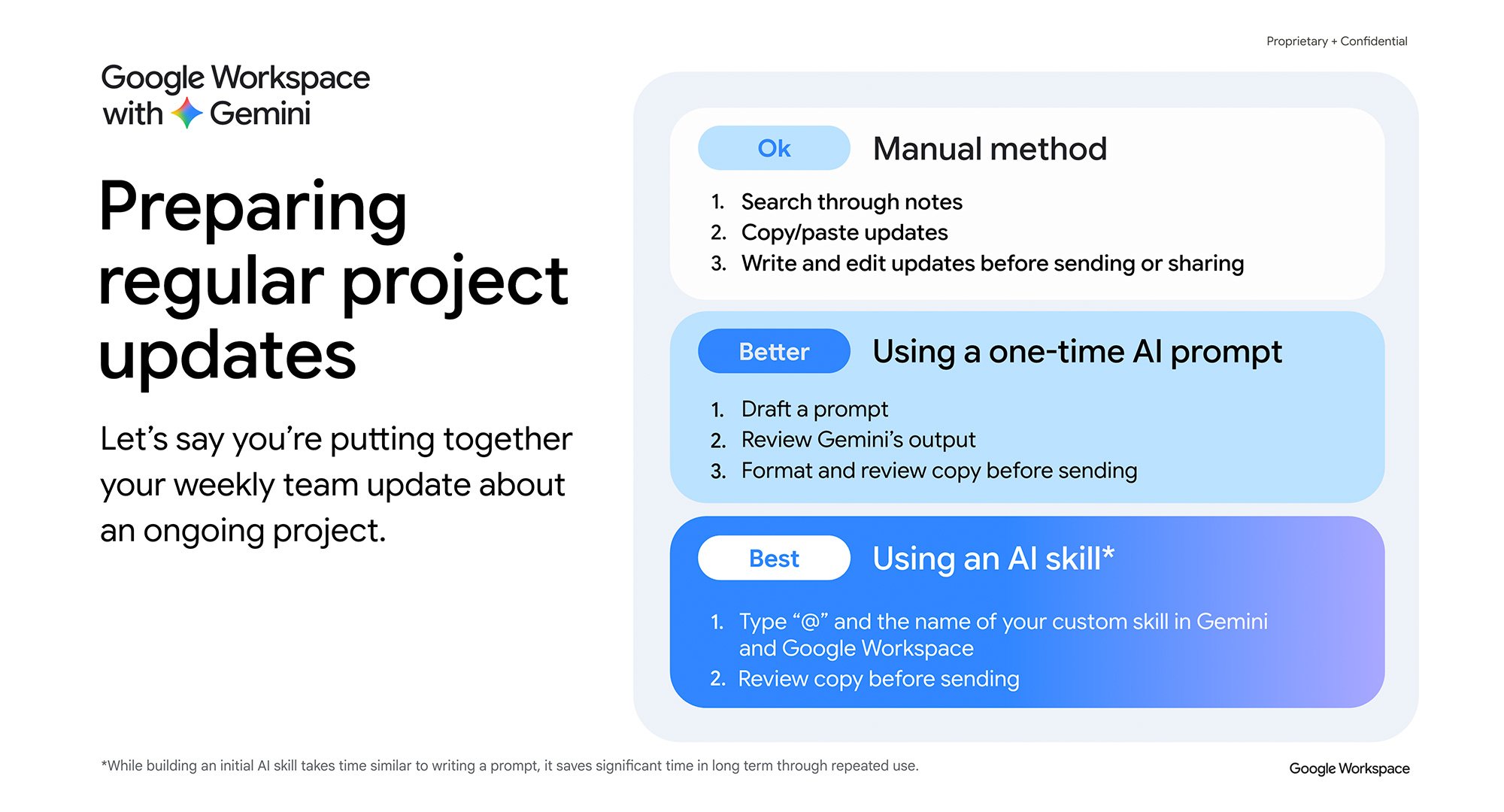
See how teams use skills in Gemini alongside Google Workspace apps throughout the workday.
Want to see how skills pair with the rest of Google Workspace? The Day in the life with Gemini infographics show how knowledge workers, sales, finance, marketing, HR, and customer service teams use Gemini across Gmail, Docs, Sheets, Slides, and more throughout their day.
Ready to help your teams scale their best work with AI? Share the Skills in Gemini 101 handbook and Day in the life with Gemini infographics with your organization today.