August Workspace Drops: Organize meeting artifacts, generate quizzes, scale custom workflows, and more
The Google Workspace Team
Try Google Workspace at No Cost
Get a business email, all the storage you need, video conferencing, and more.
SIGN UPWelcome to our August 2026 Workspace Drop! This month’s update is packed with new features to help you:
- Get visual-to-text context alignment and organized notes with Google Meet
- Generate quizzes with Help me create in Google Forms
- Enforce brand standards, templates, and processes with Workspace skills
Get visual-to-text context alignment and organized meeting notes with Google Meet
Get presentation screenshots in Meet notes: Google Meet’s Take notes for me just got a lot richer with presentation screenshots. While standard notes often lack context, Take notes for me now captures screenshots of presented slides alongside critical takeaways. You get the ‘what’ (actions/highlights) and the ‘why’ (visual context) in one high-level summary, saving you from decoding vague references like ‘as you can see on this slide.’

Get richer visuals in your meeting summaries with presentation screenshots in Google Meet.
Eliminate post-meeting chaos: Whether you’re a meeting host or an attendee, you’ve probably had to manually hunt down post-meeting files. Instead of manually searching through Drive, Google Meet now automatically organizes every artifact – meeting notes, transcripts and recordings – into a parent folder called “Google Meet” in the host’s “My Drive.” Attendees automatically get Drive shortcuts to these files, so you can skip the follow-up emails as the host. Even better? Everything is organized in one parent folder, giving you a persistent, searchable meeting hub, turning scattered files into an actionable project resource.

Get meeting notes, transcripts, and recordings consolidated into folders for each meeting.
Generate quizzes with Help me create in Google Forms
Want to build a quick knowledge-check quiz for onboarding or training but don’t have the time to build it from scratch? Help me create in Google Forms now supports quiz generation. Write a prompt describing the quiz you want, reference files from Google Drive (like Docs, Slides, or PDFs), and Gemini will generate a complete quiz, with appropriate settings, including the correct answers for each question. Preview your quiz, adjust the question types, and share it with your team in just a few clicks.
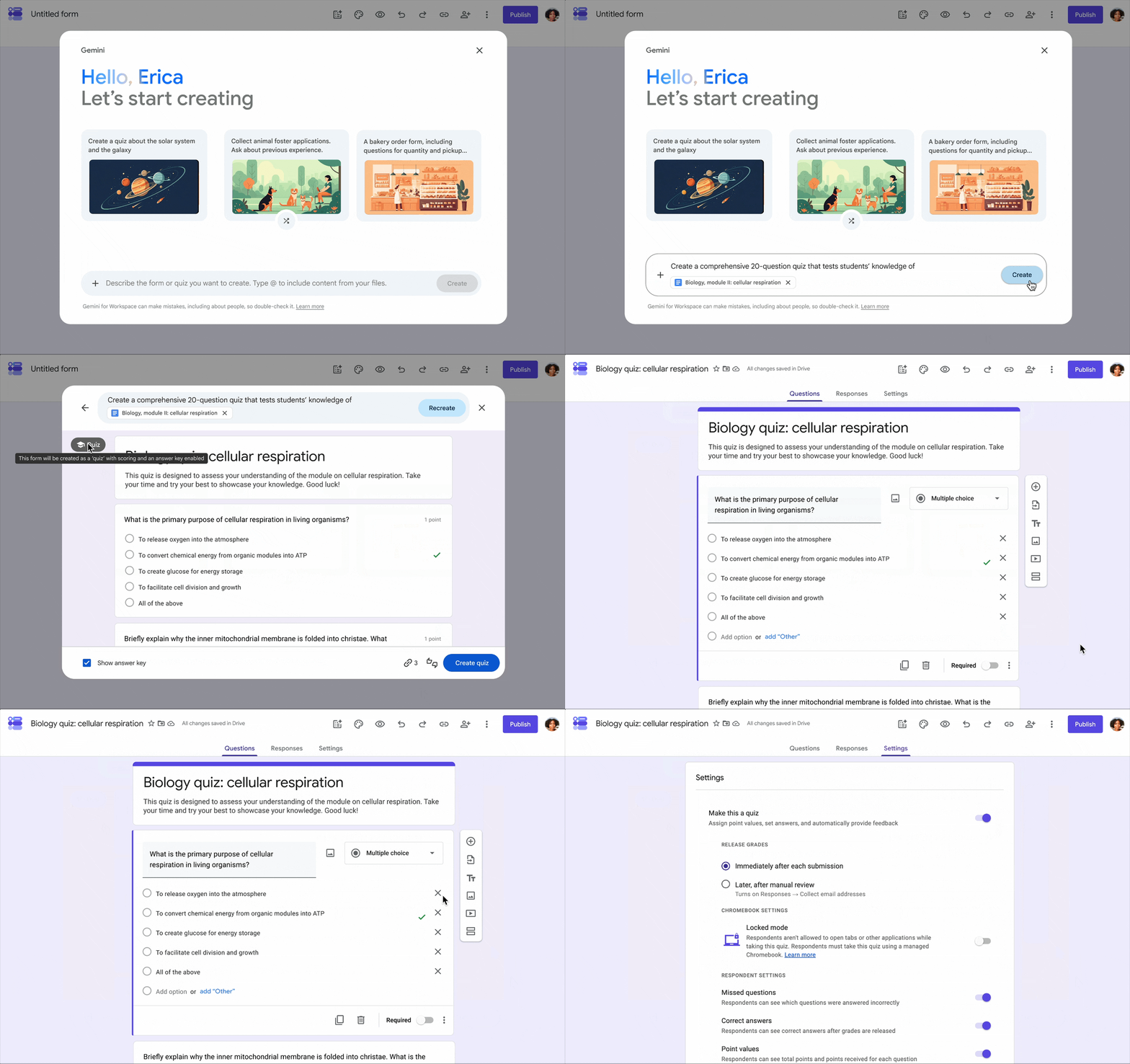
Create a quiz using a prompt and PDF file with Help me create in Google Forms.
Enforce brand standards, templates, and processes with Workspace skills
Streamline and scale your daily tasks with Workspace Studio skills: We all have tedious, recurring tasks that eat up the workday. What if you could hand them off to a specialized AI teammate? With skills in Workspace Studio, you can build and share a reusable prompt that guides Gemini to use your team’s rules, templates, and reference files to automate business processes, transforming Gemini into a highly specialized tool tailored to your team. Skills live directly in your Workspace side panels to streamline recurring tasks, such as generating:
- Brand consistency: Maintain approved tone, voice, and visual identity across email drafts and files.
- Standardized templates: Format proposals, contracts, and project trackers to exact specifications.
- Status updates: Keep updates aligned with your preferred format and living meeting notes, Chats, and files without re-uploading them.
Invoke skills anytime via @mentions across Gmail, Docs, Slides, Drive, and Chat.
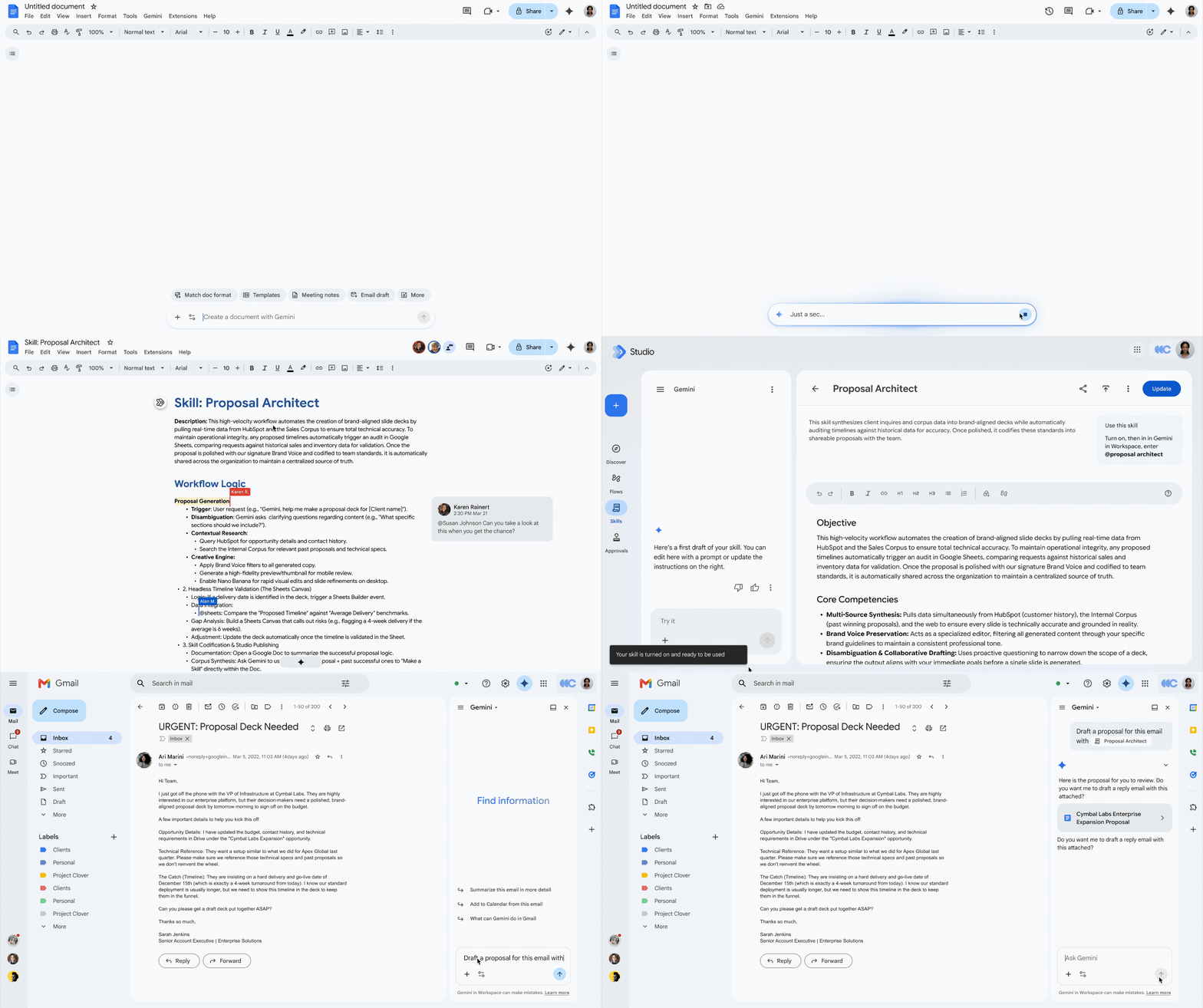
Use skills in Workspace to automate tasks, reuse formatting preferences, and scale processes.
Enable additional collaboration with enterprise security controls in Studio Flows: To help you supercharge your team’s productivity without compromising on security, we’re expanding enterprise security controls to enable additional collaboration use cases with custom, no-code agentic automation. Workspace admins can now confidently enable and adopt agentic capabilities in their organization with these controls, such as:
- Agent access management: In the admin console, admins can view and suspend all agents or targeted OAuth scopes for individual flows, such as revoking Google Drive access, in the agent access management dashboard.
- Gemini data loss prevention (DLP): Gemini DLP restricts Gemini’s ability to access Google Drive data based on content conditions and labels, with support for additional services coming soon.
- Studio data loss prevention (DLP): Studio DLP supports restrictions on Studio Flow execution, including blocking or enforcing end-user review, based on conditions of the sourced data, utilized data, and data visibility of the output.
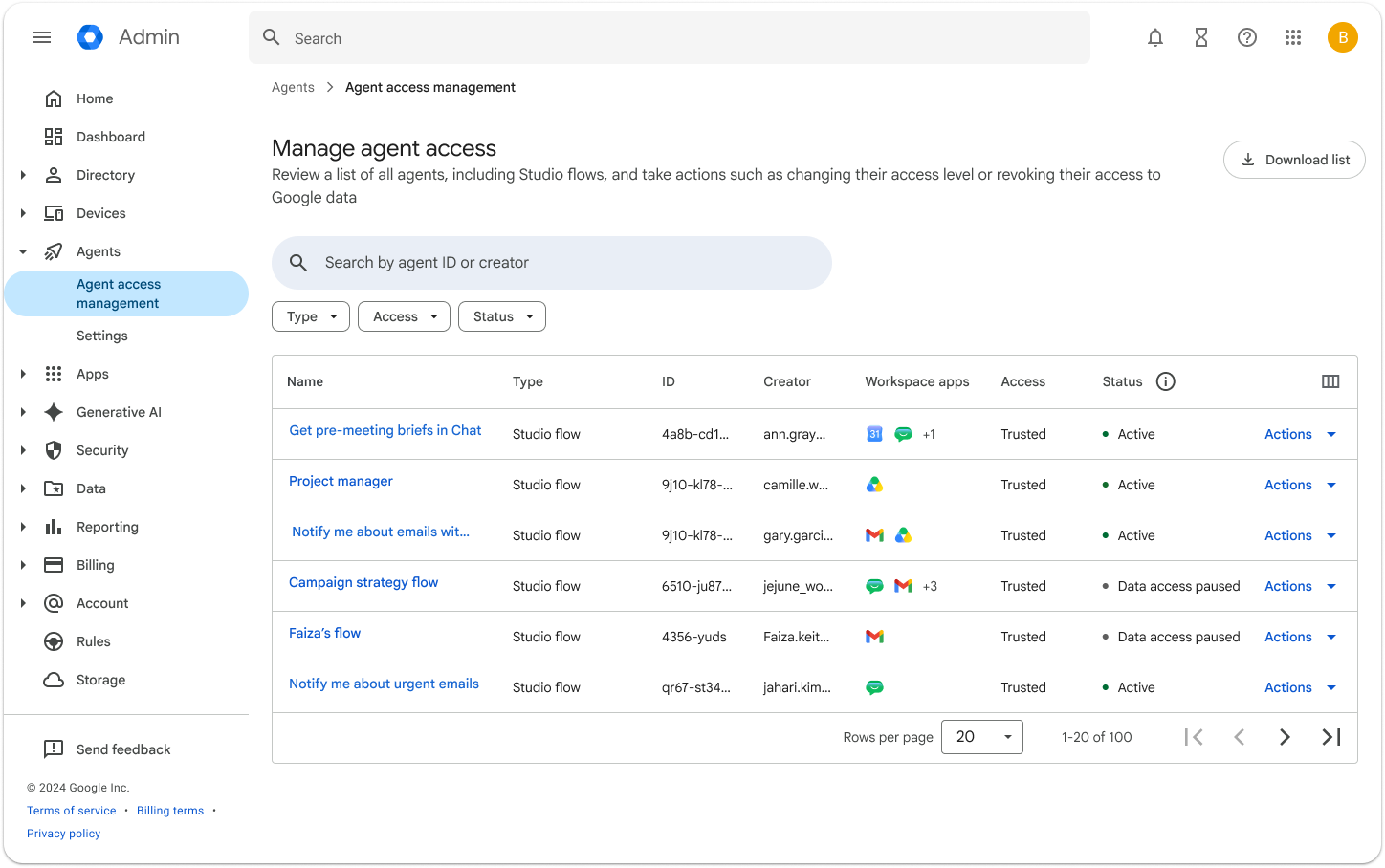
Agent access management dashboard in the Admin console provides admins with controls to suspend all or individual flows.
Get started today
These updates are rolling out to Google Workspace customers now. Learn more about unlocking the power of generative AI with Workspace. Want to chat about these features or show off what you’ve built? Join our Workspace Discord community.